

App development is changing, and the iOS Simulator is too, as it starts to appear in Cursor, Claude Code, and Codex in different ways. I’ve been developing apps since 2009 and the RocketSim developer tool since 2019, and I can tell we’re reinventing ourselves like never before.
I also started to wonder: what is the role of the Simulator these days? And what if we don’t write any code at all anymore in the future? I’m super enthusiastic about finding out the best way to develop apps, and the first step is bringing the iOS Simulator into your favorite IDE.
Time spent shifted from coding to reviewing
Whereas I previously spent most of the day writing code, I’m now mostly orchestrating multiple agents across multiple projects. I let my favorite model orchestrate a subagent without context to review my code, and some PRs are merged before I even look at the code. Yet, I never ship anything before I tested it out visually myself, and that’s why I believe the Simulator still plays a big role in app development.
Reviewing doesn’t just mean reviewing the code that will be merged; it also means reviewing the performance and functionality of something AI has developed. Agents are great at writing code, but also still great at inventing and over-engineering. Agent skills and guided AGENTS.md file go along way, but I’m at least not yet at a point that I fully trust the outcome without a critical final review.
A new role for the Simulator
WWDC 2026 brought us Device Hub, a new way to test our apps in the Simulator. Internally, it’s pretty much the same Simulator we used. However, it’s already a big change in how we can work with the Simulator. A single ‘Simulator’ can be streamed multiple times, and that’s exactly what makes me think about a new role for the Simulator.
As a developer, I want to stay in my flow. Jumping back and forth between apps and IDEs is no longer efficient, and I find myself constantly in Cursor (my current preference) just to switch between agents. Anything that can keep me in this IDE and help me move more quickly can make a difference. The benefit of being a creator of one of the most popular developer tools is also that I can build my own tooling. That’s how I recently launched AI Agents for the iOS Simulator.
It resulted in agents taking over control of app navigation and validation in the Simulator. The next step is to being able to provide feedback on the implementation within the same environment.

Reviewing designs inside Cursor, Claude Code, or Codex
I’ll be honest, I first started integrating RocketSim’s side window directly into Cursor. It didn’t work out well, as I quickly realized I was optimizing for a different audience. We don’t want the classic side window with capturing options or a status bar modifier; we want to quickly provide feedback to agents in a token-efficient manner.
That’s how I developed the first version of RocketSim 17:
It basically works as follows:
- Use RocketSim’s Agent Skill & CLI
You ask your agent to “test and validate using/rocketsim“, which will ask the agent to use RocketSim’s Agent Skill. - The agent will launch a localhost Simulator stream
You’ll be notified about the Simulator streaming on localhost, allowing you to open it inside your AI IDE’s browser. - Testing and validation are done using RocketSim’s CLI
The Agent will navigate through your app and validate the new changes in a token-efficient manner. - The Simulator will continue to stream in your browser, ready for feedback
Once the agent finishes, you can provide your feedback using RocketSim in the browser. Use the crosshair to select elements, write down comments, and provide your feedback.
This new flow keeps you inside the agentic environment. You can control the Simulator from the browser, inspect the UI, validate functionality, and directly communicate any feedback to the agent with the existing context.
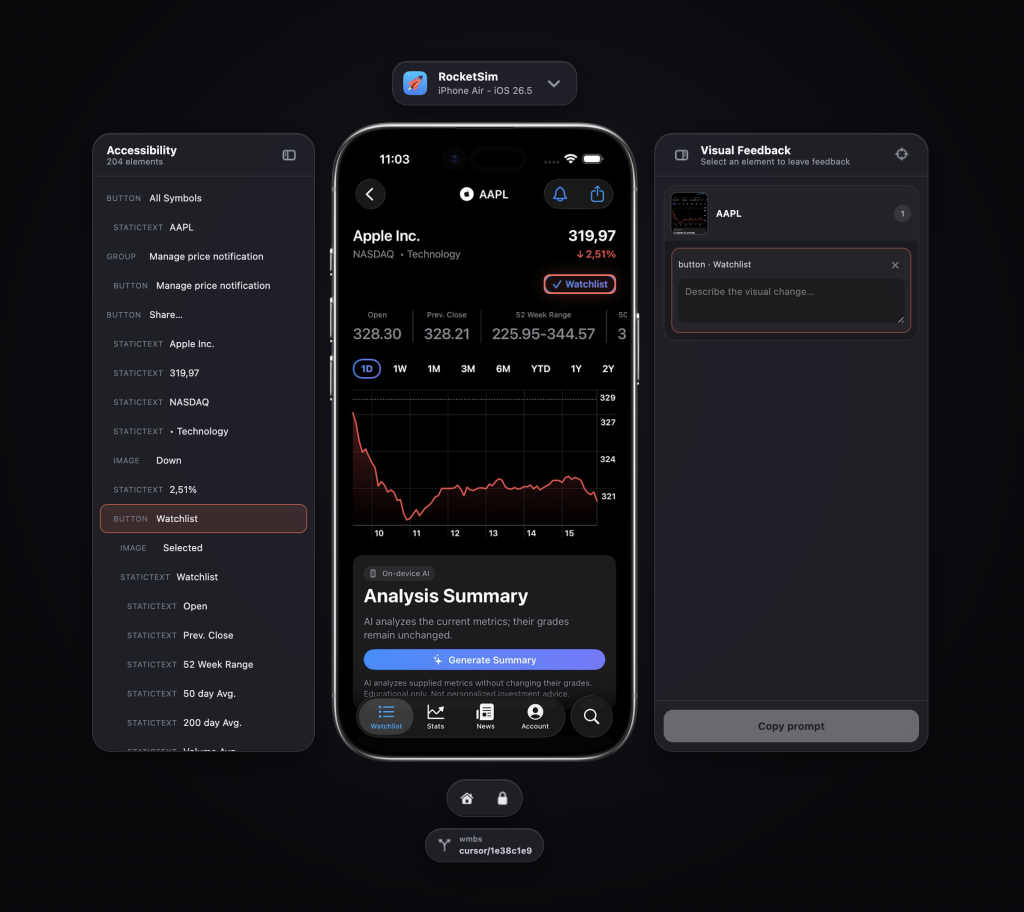
The left panel shows the accessibility hierarchy; the right panel shows your visual feedback. The bottom pill shows the worktree and the related branch, and you can navigate the app directly on the screen using the streaming iOS Simulator.
How about the performance of our apps?
Since we’re discussing ‘the future of app development’, I also want to highlight another project I’m working on. Agents can write code and build apps, but they also need to efficiently validate performance. I’m confident AI models will get better over time, but we should also provide the tools to validate when needed.
That’s why I created RocketTrace, an approachable alternative to Xcode Instruments. Right now, it lets you, as a developer, manually flag performance issues. However, in the future, RocketSim and RocketTrace will connect as a family of agents, enabling them to develop the best-performing app outcome while you focus on orchestrating multiple agents for the iOS Simulator.
Conclusion
We’re all in this together; we’re all reinventing what app development means for ourselves. We’re reading fewer blogs, buying fewer courses, viewing fewer YouTube videos, but we’re writing more code than ever before. The landscape is changing, so is our development tooling. Hopefully, the direction I’m taking with my developer tools fits your vision. Whether yes or no, please reach out to me and help me shape the future of app development.
Thanks!