

Agent Skills solves a common problem I have with AGENTS.md files across my projects. Every project that I’m working on has its own AGENTS file. Whenever I encounter an invalid AI output, I try to update my AGENTS file to prevent it from happening again. This mostly meant documenting coding styles, preferred Swift and SwiftUI methods, and knowledge of refactoring and Swift Concurrency.
The problem, however, is that I had to keep this in sync across all my projects. I also found myself writing down distinct sections for common categories like SwiftUI, Swift Concurrency, refactoring, etc. I was close to open-sourcing my AGENTS file to share it with you all, but it didn’t feel right. It’s simply not designed for sharing generic knowledge — it contains a lot of project-specific knowledge.

Why I embrace Agent Skills over AGENTS.md
That’s why I embrace Agent Skills over AGENTS.md files: I can write down really specific knowledge on a specific domain and reuse it across all my projects. I can now keep my AGENTS.md file focused on project-specific knowledge and instruct my agent tooling to reference any installed skills at the moment it makes sense.
What are Agent Skills?
Alright, Antoine, you’re enthusiastic about Agent Skills, but what are they?
It’s a good moment to bring you up to date. Agent Skills is an open format for giving agents new capabilities and expertise. You can read all about it at agentskills.io.
A single skill can contain folders of instructions, scripts, and resources that agents can use to perform specific tasks more accurately. They offer domain expertise and repeatable workflows, reusable across different skills, compatible agent products.
Widely adopted
Which brings me to adoption: Agent Skills are already widely adopted. Codex, Gemini, Claude, Cursor: they all support skills. There’s really no reason not to use them today.
An example Agent Skill: Swift Concurrency
To give you a better understanding of the impact of Agent Skills, I’d like to introduce you to an Agent Skill I’ve created myself: github.com/AvdLee/Swift-Concurrency-Agent-Skill.
I’ve used all 70+ lessons from my swiftconcurrencycourse.com to create an up-to-date skill on the latest Swift Concurrency features. The skill is structured as follows:
swift-concurrency/
├── SKILL.md                    # Main skill file with decision trees
└── references/
    ├── async-await-basics.md   # Fundamentals of async/await syntax
    ├── tasks.md                # Task lifecycle, cancellation, priorities
    ├── sendable.md             # Isolation domains and Sendable conformance
    ├── actors.md               # Actor isolation, global actors, reentrancy
    ├── async-sequences.md      # AsyncSequence and AsyncStream patterns
    ├── threading.md            # Threads vs tasks, suspension points
    ├── memory-management.md    # Retain cycles, weak self, isolated deinit
    ├── core-data.md            # Core Data integration patterns
    ├── performance.md          # Optimization with Xcode Instruments
    ├── testing.md              # Testing concurrent code
    ├── migration.md            # Step-by-step Swift 6 migration guide
    ├── glossary.md             # Terms & concepts for Swift Concurrency
    └── linting.md              # Linting rules for strict concurrency
With this structure in mind, I’d like you to explain how the skill works.
FREE 5-Day Email Course: The Swift Concurrency Playbook
A FREE 5-day email course revealing the 5 biggest mistakes iOS developers make with with async/await that lead to App Store rejections And migration projects taking months instead of days (even if you've been writing Swift for years)
How Agents use Skills
In this example, I want you to understand how I install Agent Skills in my projects. For this, I’m using a CLI called openskills. It allows me to install a skill using this command:
openskills install avdlee/Swift-Concurrency-Agent-SkillAfter which I can sync it into a project-specific AGENTS file accordingly:
openskills syncThis will update your AGENTS.md file to instruct agents to reference a skill when appropriate:
<skills_system priority="1">

## Available Skills

<!-- SKILLS_TABLE_START -->
<usage>
When users ask you to perform tasks, check if any of the available skills below can help complete the task more effectively. Skills provide specialized capabilities and domain knowledge.

How to use skills:
- Invoke: Bash("openskills read <skill-name>")
- The skill content will load with detailed instructions on how to complete the task
- Base directory provided in output for resolving bundled resources (references/, scripts/, assets/)

Usage notes:
- Only use skills listed in <available_skills> below
- Do not invoke a skill that is already loaded in your context
- Each skill invocation is stateless
</usage>

<available_skills>

<skill>
<name>swift-concurrency</name>
<description>'Expert guidance on Swift Concurrency best practices, patterns, and implementation. Use when developers mention: (1) Swift Concurrency, async/await, actors, or tasks, (2) "use Swift Concurrency" or "modern concurrency patterns", (3) migrating to Swift 6, (4) data races or thread safety issues, (5) refactoring closures to async/await, (6) @MainActor, Sendable, or actor isolation, (7) concurrent code architecture or performance optimization, (8) concurrency-related linter warnings (SwiftLint or similar; e.g. async_without_await, Sendable/actor isolation/MainActor lint).'</description>
<location>project</location>
</skill>

</available_skills>
<!-- SKILLS_TABLE_END -->

</skills_system>
The description provides context and is basically the entry point for whether an agent will use your skill as a reference. As soon as it decides to do so, the SKILL.md file is referenced.
The SKILL.md as an entry point
You should see the SKILL.md file as a summary of the Agent Skill. It guides the agent, tells it about the specific skill, but also references other files if needed. For my Swift Concurrency skill, the decision path partly looks like this:
When a developer needs concurrency guidance, follow this decision tree:
- Starting fresh with async code?
- Read
references/async-await-basics.mdfor foundational patterns- For parallel operations →
references/tasks.md(async let, task groups)- Protecting shared mutable state?
- Need to protect class-based state →
references/actors.md(actors, @MainActor)- Need thread-safe value passing →
references/sendable.md(Sendable conformance)- Managing async operations?
- Structured async work →
references/tasks.md(Task, child tasks, cancellation)- Streaming data →
references/async-sequences.md(AsyncSequence, AsyncStream)etc.
But before it does, there’s an even more important reason why I love this specific Swift Concurrency skill for my projects. Yes, I’m biased, but for a good reason.
The importance of domain expertise
I truly believe that Agent Skills perform best when created by someone with deep domain knowledge. For Swift Concurrency, with my dedicated course and 70+ lessons, I feel I’m an expert enough to develop this skill. This results in skills that cover a lot of ground, but also start with the right evaluation.
For the Swift Concurrency skill, this means first evaluating the project itself:
- Does it use Default Actor Isolation?
- Which Swift version is used?
- Are upcoming features like
nonisolatednonsendingbydefaultenabled?
The outcome of these settings affects how Swift Concurrency should be applied. By using the Swift Concurrency skill myself, I’ve already removed many unnecessary @MainActor attributes in my project because the default actor is already the main actor. The skill was able to find these perfectly using the guidance of the reference files.
I’ve already seen quite a few open-sourced skills. They’re great and valuable, but they often lack the in-depth knowledge I hope to see for a specific skill. Some are even opinionated, like introducing certain specific architectures to my SwiftUI code. I’d love to use skills based on best practices and generally agreed coding changes. Replace deprecated methods with the latest APIs, but don’t force me to use MVVM when I don’t want to.
How do I use Agent Skills?
To answer that question, it’s best to watch my YouTube video in which I demonstrate how you can install & use Agent Skills:
In this video, I’m using openskills together with Cursor AI. However, you can also use other tools like Codex CLI:
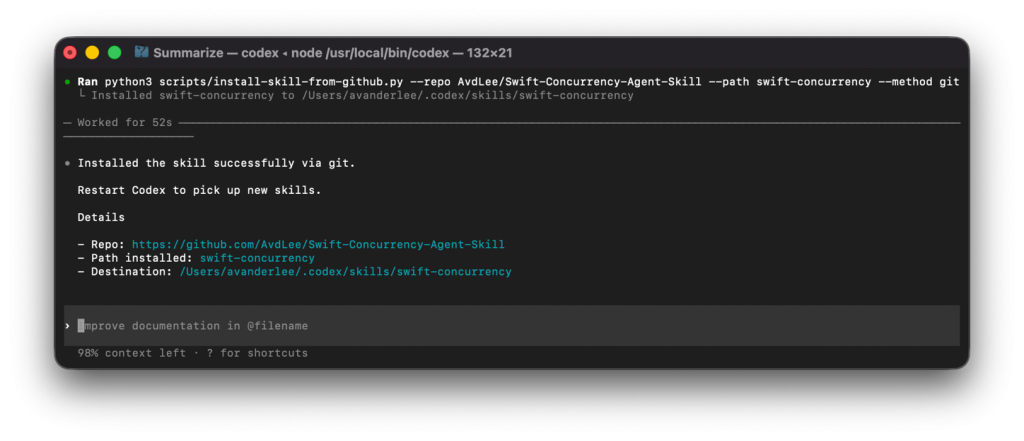
To do this, you need to start with the /skills command followed by the $skill-installer command:
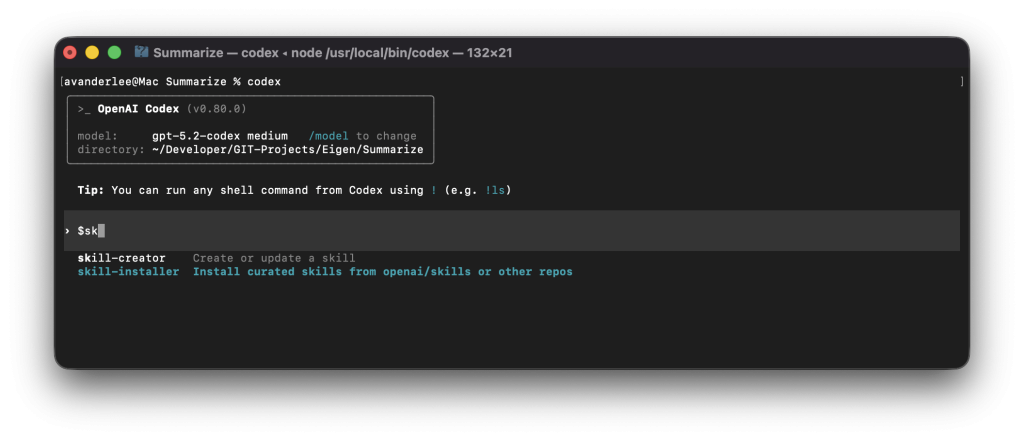
Follow the instructions, and you’re ready to use your skill. You can do so by using the /skills command again and selecting the skill you want to use.
An example could be to use the Swift Concurrency Skill and prompt it to:
Analyze the current project for Swift Concurrency improvements
In the terminal, this will look as follows:
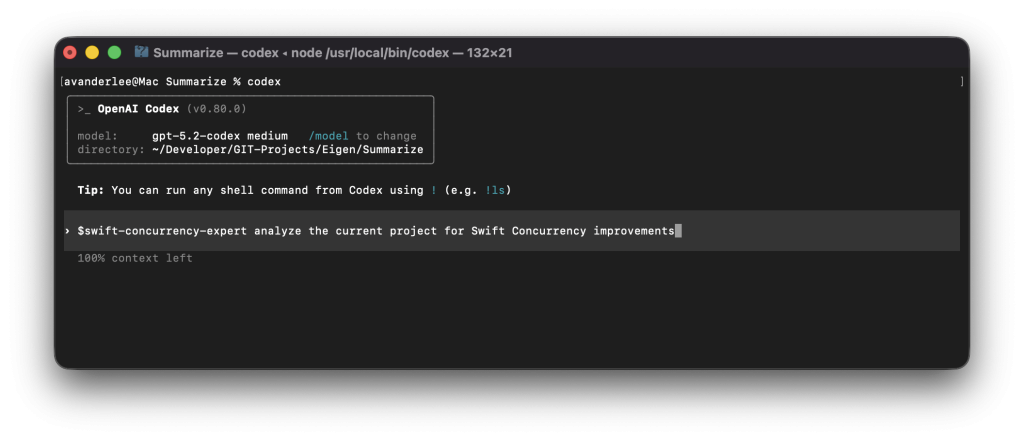
Depending on how well you’ve written your concurrency code, the outcome of this command will differ. There are many more prompts that you could potentially use:
- “Find out whether we use
@MainActorin places where it’s not required” - “Analyze the current project and see whether we should move code to run in the background using @concurrenct in Swift Concurrency”
- “Help me migrate to Swift Concurrency by refactoring file X”
The first reports from developers who use my skill have been highly positive, and I can’t imagine working without it anymore. At anytime, you’ll be able to dive deeper into any specifics by looking at my Swift Concurrency course, which follows the exact same module structure as the skill references domain sections.
Conclusion
Agent Skills have drastically changed how I develop with agents. My AGENTS.md files have become simpler, and I can easily share domain expertise via skills across any of my projects.
If you want to improve your AI development knowledge, even more, check out the AI Development Category page. Feel free to contact me or tweet me on Twitter if you have any additional tips or feedback.
Thanks!