

You can reduce token usage in Claude Code, Codex, and Cursor by guarding what your agent reads, not what it writes. I analyzed 1,674 of my own agent sessions across RocketSim, RocketTrace, and my other Swift apps: only 0.6% of my tokens were the agent’s replies. The rest was the agent re-reading the same context over and over again.
In this article, I’ll share what I found, the 10 lines I’ve added globally to every agent I use, and one hook script that makes every Xcode project token-efficient without touching a single AGENTS.md file. Let’s dive in!
How I analyzed my token usage
I’m mainly using Cursor these days and it stores a transcript for every agent session, including each tool call the agent makes. I wrote a small script that walks through all of them and counts behavior that wastes tokens: full-file reads, repeated reads, unfiltered builds, polling, skill loads, and subagent model choices. On top of that, I exported one week of usage data from the Cursor dashboard, which shows the token mix per request.
These are the numbers that stood out:
- 94.2% of all tokens were cache reads. That’s the agent re-sending context it already has. Output tokens were only 0.6%.
- 48% of all 13,323
xcodebuildandswift testruns had no output filter. Even in RocketSim, where theAGENTS.mdfile explicitly asks for a filter, 751 of 2,141 builds ran raw. - 53% of file reads loaded the complete file, and in half of my sessions, the agent re-read a file it had already read without editing it in between. That happened 18,683 times.
- 961 duplicate skill loads: the same
SKILL.mdloaded twice in one session. - 85% of subagents inherited my main model, while they were only searching or exploring.
Of course, these are specific to my way of working and a similar analysis might be possible if you’re using e.g. Codex or Claude. The median request in my usage export was about 755,000 tokens. That number only makes sense once you understand how an agent consumes context.
Why context drives your token usage
An agent doesn’t remember anything between steps. Every time it calls a tool and continues, it sends the complete conversation back to the model: your instructions, the rules, every file it read, and every build log it received. Caching makes this faster, but the tokens still count, and it’s why cache reads dominate my usage.
You can compare it to a colleague who re-reads the entire project wiki before answering each question. The bigger the wiki, the slower and more expensive every answer becomes. A 400,000-token build log you received early in the session is sent along with every step that follows.
This leads to a second problem. Once the context window fills up, the agent summarizes the conversation or you start over. Both mean the agent has to read files and rules again to rebuild its understanding. The sooner your context fills up, the more often you pay for that reset.
This is also why I start a new chat whenever I switch to an unrelated task. Otherwise, the agent carries every file and build log from the previous task into work that doesn’t need it.
In other words: guarding context is the most effective way to reduce token usage. Shorter replies help, but they’re optimizing the 0.6%: not my focus for now.
Keep your AGENTS.md file small
Your AGENTS.md file is part of that context, on every step, in every session. An unmaintained file grows with each lesson learned, and before you know it, you’re sending release procedures and CI details along with a simple SwiftUI tweak.
It happens faster than you think. Video Compression is my newest app. Two weeks ago, its AGENTS.md was about 2,000 estimated tokens. Today, it’s over 15,000 tokens and 228 lines, filled with lessons learned along the way. All of that is sent along with every step, even when the agent only changes a label.
I cleaned up my other projects in September. RocketTrace’s root AGENTS.md went from 8,677 to 1,454 bytes, and MCPBeast’s from 8,166 to 1,384 bytes. Nothing was removed; I moved scoped knowledge into sub-folders with their own AGENTS.md files or into docs that the agent only opens when it works in that area:
# RocketTrace

- App code: see [app/AGENTS.md](app/AGENTS.md)
- Website: see [website/AGENTS.md](website/AGENTS.md)
- Release process: see [docs/releasing.md](docs/releasing.md). Only read when releasing.
Codex even warned me about this. Its log showed a project AGENTS.md file that exceeded its 32 KB budget, after which it simply truncated the remainder. You might expect your instructions to be read completely, but large files are cut off without you noticing.

Duplicate Agent Skills load for nothing
Agent Skills solve the same problem as scoped docs: the agent only sees a short description until a task needs the skill. I’ve written about this in Agent Skills: Replacing AGENTS.md with reusable AI knowledge. However, skills only save tokens if you keep your collection clean.
I had two local SwiftUI skills installed next to my open-source SwiftUI Agent Skill. They covered the same framework, so agents regularly loaded both. My session audit showed that one of the duplicates was loaded in 41 sessions before I removed it, while it added nothing the other skill didn’t cover. Since removing it, SwiftUI work routes to a single skill. On top of that, every installed skill adds its description to the catalog your agent receives in every session.
My advice: install one skill per framework, and remove the ones you haven’t used in months. If you’re unsure which one to keep, my 9-step framework for choosing the right Agent Skill helps.
Xcode build output is the biggest token waste
This is the one that’s unique to us as Swift developers. Xcode’s build output is enormous. I measured a clean test run of MCPBeast, my Mac app, with 117 tests:
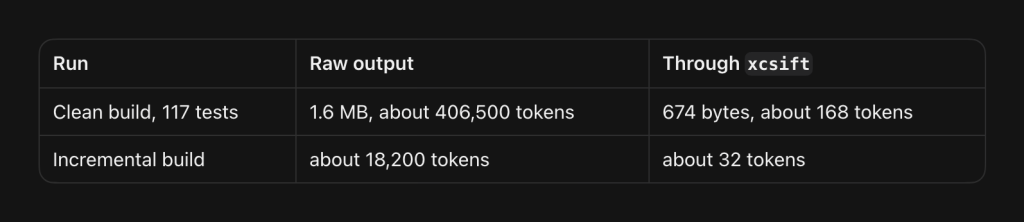
An incremental run is smaller, but the ratio is the same: 18,200 estimated tokens raw versus 32 with a filter. The filtered output still lists both compiler warnings with file and line number, and the number of passed tests. That’s everything the agent needs.
xcsift is a small command-line tool that parses xcodebuild and Swift Package Manager output into a compact summary. You install it with Homebrew and pipe your build into it:
brew install ldomaradzki/xcsift/xcsift
xcodebuild test -scheme MyApp -destination 'platform=macOS' 2>&1 | xcsift -f toon -w
RocketSim’s AGENTS.md asks agents to do this. Yet, as the numbers showed, agents still ran 751 raw builds in that repository. Instructions are suggestions to an agent. And all my newer projects didn’t have the instruction at all, so they were silently burning tokens on every build.
That’s why I stopped relying on AGENTS.md for this and moved it into a global hook.
One global hook for Claude Code, Codex, and Cursor
Cursor, Claude Code, and Codex all support hooks: small scripts that run before the agent executes a tool. A hook can inspect a shell command and change it before it runs. This means you can fix build output once, on your machine, for every project you’ll ever open.
My hook script looks at each shell command. If it runs xcodebuild, swift build, or swift test without a filter, it appends 2>&1 | xcsift -f toon -w. It leaves everything else alone, including commands that already use a filter, xcodebuild -list, and commands with redirects or pipes. If xcsift isn’t installed, it does nothing.
Save it as ~/.agents/hooks/xcode-output.py:
#!/usr/bin/env python3
"""Route raw xcodebuild and SwiftPM build/test output through xcsift."""
import json
import re
import shutil
import sys

FILTER = "xcsift -f toon -w"
BUILD = re.compile(
    r"(^|[\s;&(])(xcodebuild\b(?!.*\s-(version|showsdks|list|showBuildSettings|showdestinations|help)\b)"
    r"|swift\s+(build|test)\b)"
)
ALREADY_FILTERED = re.compile(r"xcsift|xcbeautify|xcpretty|\s-quiet\b")
UNSAFE = re.compile(r"[|<>`\n]|\$\(|(?<!&)&(?!&)|;|\|\|")


def command_of(tool_input):
    command = tool_input.get("command") if isinstance(tool_input, dict) else None
    if isinstance(command, list):
        command = command[-1] if command else None
    return command if isinstance(command, str) else None


def filtered(command):
    command = re.sub(r"\s+2>&1\s*$", "", command.strip())
    if not BUILD.search(command) or ALREADY_FILTERED.search(command):
        return None
    if UNSAFE.search(command) or shutil.which("xcsift") is None:
        return None
    *prefix, last_segment = command.split("&&")
    if not BUILD.search(last_segment):
        return None
    # Claude auto-approves rewritten commands, so only `cd <path> &&` may precede the build.
    if any(not re.fullmatch(r"\s*cd\s+[^\s].*?\s*", part) for part in prefix):
        return None
    return f"set -o pipefail; {command} 2>&1 | {FILTER}"


def main():
    mode = sys.argv[1] if len(sys.argv) > 1 else "--cursor"
    try:
        tool_input = json.load(sys.stdin).get("tool_input") or {}
        command = command_of(tool_input)
        rewritten = filtered(command) if command else None
    except Exception:
        rewritten = None

    if rewritten is None:
        print("{}")
    elif mode == "--cursor":
        print(json.dumps({"updated_input": {**tool_input, "command": rewritten}}))
    elif mode == "--claude":
        print(json.dumps({"hookSpecificOutput": {
            "hookEventName": "PreToolUse",
            "permissionDecision": "allow",
            "updatedInput": {**tool_input, "command": rewritten},
        }}))
    else:
        print(json.dumps({"hookSpecificOutput": {
            "hookEventName": "PreToolUse",
            "permissionDecision": "deny",
            "permissionDecisionReason": f"Raw build output wastes context. Re-run exactly as: {rewritten}",
        }}))


if __name__ == "__main__":
    main()
The set -o pipefail makes sure a failing build still returns a failing exit code, even though xcsift is the last command in the pipe. And yes, an agent wrote this code for me, so feel free to prompt an agent yourself and optimize it further!
Registering the hook in Cursor
Cursor reads user-level hooks from ~/.cursor/hooks.json. Create it with the following content:
{
  "version": 1,
  "hooks": {
    "preToolUse": [
      {
        "command": "python3 ~/.agents/hooks/xcode-output.py --cursor",
        "matcher": "Shell",
        "timeout": 5
      }
    ]
  }
}
Cursor reloads the file on save. You can verify it in the Hooks tab of Cursor’s settings.
Registering the hook in Claude Code
Claude Code reads hooks from ~/.claude/settings.json:
{
  "hooks": {
    "PreToolUse": [
      {
        "matcher": "Bash",
        "hooks": [
          {
            "type": "command",
            "command": "python3 ~/.agents/hooks/xcode-output.py --claude",
            "timeout": 5
          }
        ]
      }
    ]
  }
}
Claude Code only applies a rewritten command when the hook approves it. That’s why the script only rewrites build commands that are optionally preceded by cd. A chain like rm -rf build && xcodebuild is left alone and goes through your normal approval.
Registering the hook in Codex
Codex supports the same hook format in ~/.codex/hooks.json, after enabling hooks in ~/.codex/config.toml:
[features]
hooks = true
{
"hooks": {
"PreToolUse": [
{
"hooks": [
{
"type": "command",
"command": "python3 ~/.agents/hooks/xcode-output.py --codex",
"timeout": 5
}
]
}
]
}
}Codex is a bit different. It matches commands against the ones you’ve approved before, so a rewritten command would ask for approval again. Instead of rewriting, the hook blocks the raw build and tells the agent the exact command to run. That costs one short extra step, which is nothing compared to a full build log.
Navigating the Simulator without screenshots
The same thinking applies to the Simulator. A screenshot is an image the agent has to process, and it only tells the agent what’s visible. An accessibility tree is text: every button, label, and identifier, ready to act on.
My agents made 8,145 RocketSim CLI calls in the analyzed period, against 378 raw simctl screenshots. That balance is on purpose. I’ve explained the details in my article on token-efficient Simulator automation, so I won’t repeat them here. The short version: let your agent inspect the Simulator through RocketSim’s accessibility output, and only take a screenshot when it needs to verify something visual.
Does a cheaper model reduce token usage?
Not always. A cheaper model can use more tokens in total when it needs extra attempts, and a model with a small context window resets more often. Model choice influences token usage in two ways you might not expect.
First, context windows differ per model. A model with a smaller window fills up sooner, which means more summaries and resets, and more re-reading after each reset. Check the context size of the model you pick, especially for long sessions in large projects.
Second, a cheaper model doesn’t automatically mean fewer tokens. Every step re-reads the full context, so a model that needs three attempts to fix a failing test reads that context three times as often as a model that fixes it in one pass. For complex changes, I prefer a stronger model that finishes quickly.
The opposite is true for subagents. 85% of my subagents inherited my main model, while most of them were only searching the codebase. Searching doesn’t need your strongest model. Give exploration subagents a small, fast model, and keep the main model for decisions and edits.
What about Caveman and Ponytail?
You’ve probably seen these two trending on GitHub. Both are useful ideas, and both inspired lines in my rules below.
Caveman makes your agent reply in short, caveman-style sentences. JetBrains tested the skill on 86 real coding tasks and measured 8.5% fewer output tokens without a quality loss. However, remember my numbers: output was 0.6% of my tokens. The project is honest about this in its own documentation, and it’s why they built a separate proxy that shrinks what the agent reads. I kept one idea: lead with the result and stop narrating tool calls.
Ponytail makes your agent act like a lazy senior developer: does this need to exist, does the codebase already have it, does the platform cover it? For us, that means reaching for DatePicker, ShareLink, or URLSession before writing custom code or adding a dependency. Less code means fewer tokens to write and to read back later. Their benchmark was run on a Claude model with a web project, and their own results show OpenAI’s reasoning models doing worse with the extra rules, so it’s worth testing on your setup. I kept the core question and dropped the rest.
10 rules to reduce token usage in every agent
These are the lines I now use globally. Each one maps to something I found in my sessions. I wrote them in my own words, inspired by the ideas above:
# Token-efficient agent work

- Search first, then read only the lines you need. Don't re-read a file you already have unless it changed.
- Run the narrowest test first (`-only-testing:` or `--filter`). Run the full suite once, at the end.
- Wait inside one command (`gh run watch`, `gh pr checks --watch`, an `until` loop) instead of repeated sleep-and-check turns.
- Inspect the Simulator through its accessibility tree (for example, the RocketSim CLI). Take a screenshot only to verify visuals.
- Load a skill only when the task needs it. Never load two skills that cover the same framework.
- Give search and exploration subagents a small, fast model. Keep the main model for decisions and edits.
- Before adding code, check whether this codebase, the Swift standard library, or an Apple framework already solves it. Then write the smallest change that works, without dropping validation, error handling, or accessibility.
- Lead with the result. Skip restating the plan and narrating tool calls, but keep sentences complete.
- After two failed attempts at the same fix, stop and report what you learned instead of looping.
- Delegate self-contained searches and investigations to a subagent so their reads stay out of this conversation. When the user switches to an unrelated task, suggest a new chat with a short handoff note.
The line about waiting deserves a short explanation. My agents used sleep 4,209 times, but most of those were harmless pauses inside a command, like relaunching an app. The waste was in 740 turns where the agent slept, checked CI, and slept again. Each of those turns re-reads the full context. A single gh run watch waits in one step instead.
You don’t have to add these to every project. Each agent supports a global instructions file:
- Cursor: Settings → Rules → User Rules
- Claude Code:
~/.claude/CLAUDE.md - Codex:
~/.codex/AGENTS.md
I keep the lines in one file and import it with @~/.agents/token-efficient-agents.md from ~/.claude/CLAUDE.md, while ~/.codex/AGENTS.md is a symlink to the same file. Your project AGENTS.md files can then focus on what’s unique to each project.
Frequently asked questions
Re-reading context. In my usage data, 94.2% of all tokens were cache reads: the agent re-sending instructions, files, and tool output it already had with every step. Replies were only 0.6%. Large build logs, full-file reads, and long conversations make every following step more expensive.
Caveman shortens the agent’s replies. JetBrains measured 8.5% fewer output tokens on 86 coding tasks, without a quality loss. Since replies were only 0.6% of my tokens, the effect on my total usage is small. Reducing what the agent reads, like build output and repeated file reads, has a much bigger impact.
Claude Code reads ~/.claude/CLAUDE.md, Codex reads ~/.codex/AGENTS.md, and Cursor uses User Rules in its settings. Instructions in these locations apply to every project. Use them for general habits, like reading line ranges, and keep project-specific knowledge in each repository’s own AGENTS.md file.
Pipe your build through xcsift: xcodebuild test ... 2>&1 | xcsift -f toon -w. It keeps errors, warnings, and test results, and drops the rest. In my measurement, a clean MCPBeast test run went from about 406,500 estimated tokens to about 168. A global hook applies this to every project automatically.
Conclusion
Reducing token usage is mostly about guarding context. Output tokens barely mattered for me, while every build log, full-file read, and duplicate skill were sent along with each step that follows. For Swift developers, raw xcodebuild output is the biggest offender in my experience, and a global hook fixes it for every project at once, instead of hoping each AGENTS.md instruction gets followed.
If you want to improve your AI development workflow even more, check out the AI Development category page. Feel free to contact me or tweet me on Twitter if you have any additional tips or feedback.
Thanks!