

AI agents are my biggest friends these days. I’m even making jokes to my wife, saying that Arie and Ingrid (AI) are doing my work while we’re having lunch. I’ve been developing apps since 2009, but I can’t remember changing my workflow so much as in the past months after embracing AI development.
I doubted writing down my learnings, as I feel like I’m learning new things every day. So I might as well wait a bit longer so you have more to learn from. Yet, I realized this will be an endless learning path, so I might as well check in with you on where I am today.
1. Not using plan mode
It’s tempting to jump straight into execution. Especially once you start trusting the agent to “just do the work”. I eventually trusted AI so much that I started writing shorter prompts and easily executed many things in parallel.
That trust can be misleading. I often ended up surprised by the output, not because it was wrong, but because it didn’t match what I had in mind.
Plan mode changed that. It forces intent to become explicit before code is written. Instead of reacting to output, I react to a plan. Even that plan was often not what I expected, but at least I didn’t wasted tokens and time.
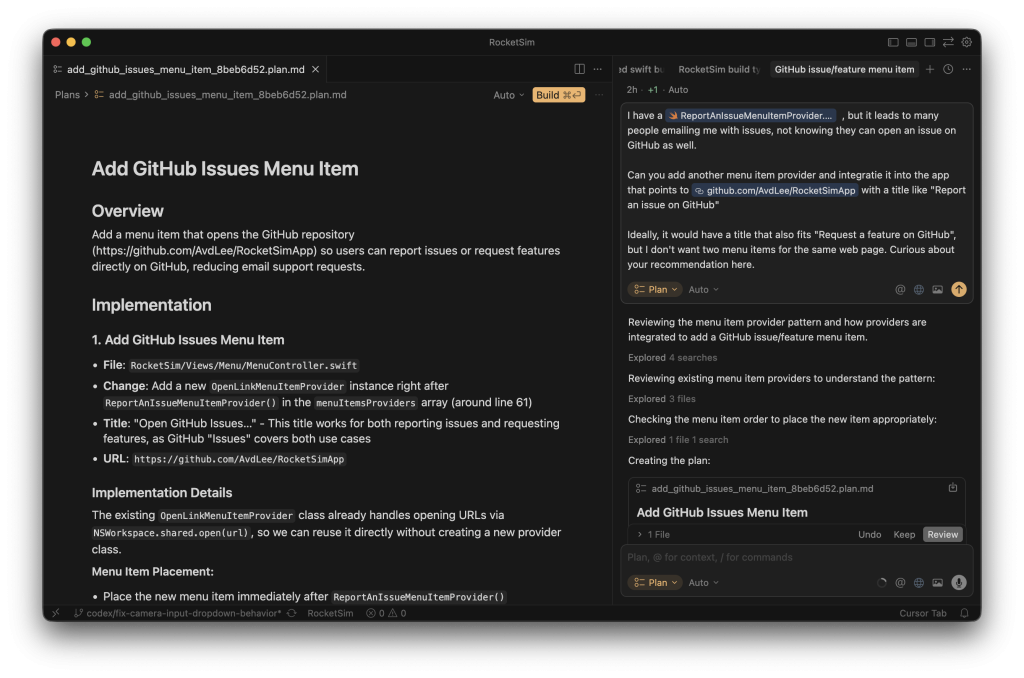
The above image shows a planning prompt I executed this morning in Cursor AI, the IDE I prefer using. The ⇧ Shift + ↹ Tab shortcut is my favorite these days.
My code quality and productivity improved drastically once I started using plan mode intentionally. Not because plans are special, but because skipping them usually meant skipping the hard thinking. Instead of wasting time on fixing a bad starting prompt, wasting context, or even reverting all that was done, I now make sure I start as good as possible.
2. Treating prompts as one-offs
I used to prompt directly in AI Agents like Cursor or Codex, treating each interaction as disposable. That felt fast, but it resets context every time. I was repeatedly explaining the same constraints, preferences, and architectural decisions. Sometimes solved with an AGENTS file, but those are often not as in-depth as I needed.
I now maintain a custom ChatGPT Project trained with data related to my codebase. I use it to create agent and planning prompts, and the output quality improved significantly. It contains data like in-depth PDFs, audience information, Reddit threads, and much more. I demonstrate this concept in this video:
The key difference is continuity. A prompt isn’t just a request anymore; it’s built on accumulated context. If you don’t construct that context deliberately, the model will fill in gaps on its own. You usually only notice after it has already made choices you didn’t intend to delegate.
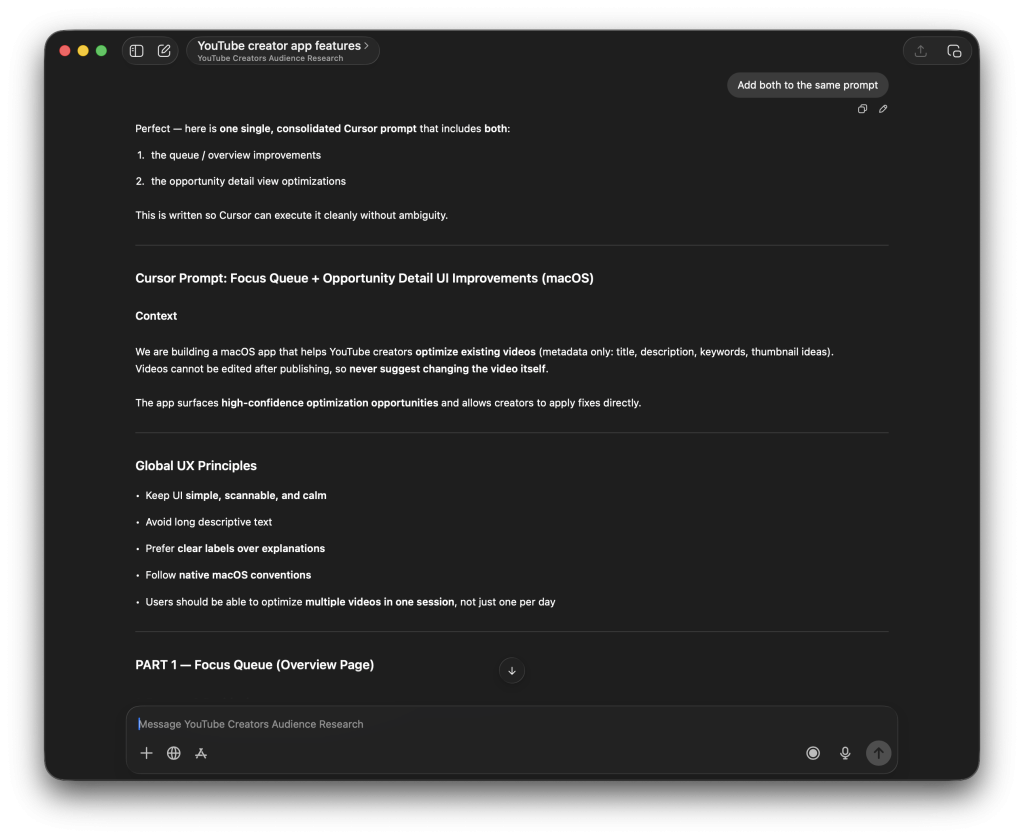
For my From App Idea to 10K MRR YouTube Series, I’m building an app for YouTube Creators. The GPT project has knowledge of existing tools, of what YouTube creators want, and of what they complain about on Reddit. I’ve often seen my initial prompt being guided completely differently, since my project knows what my app should and shouldn’t do. In the above image, you can even see it giving context to the prompt about the app we’re building.

3. Ignoring skills
A detour into Codex CLI (more on that later) introduced me to Agent Skills. These reduced my AGENTS.md file and drastically improved the knowledge of my agents. Installing a skill feels like hiring a new colleague: you’re adding a capability you expect to work the same way every time.
For knowledge I already had, I started creating my own skills. That process forced me to articulate what I actually do when I work well, not just what I think I do. It almost feels like a representation of the personal skills I have. I recommend reading Agent Skills explained: Replacing AGENTS.md with reusable AI knowledge if you want to learn more.
4. Letting the model decide everything
Tools like Cursor offer Auto mode to select the best model for the job. This is convenient, but convenience can quietly shift responsibility.
For difficult tasks, I deliberately choose reasoning models. Not because I want “smarter answers”, but because I want explicit thinking and fewer unexplained leaps. It results in a high-quality plan, ready to be executed by potentially cheaper models inside AI Agents.
I really believe: garbage in, garbage out. I do everything I can to create the best possible execution plan.
Letting auto mode decide everything also means letting it decide what “good enough” looks like. Being explicit about model choice is a way of staying accountable for the kind of work being done. No worries if you’re not familiar with all models yet; you’ll learn over time. My current go-to planning model are the reasoning models from OpenAI.
5. Prompting everything at once
Doing everything in one prompt is extremely tempting. As I mentioned before, I started to trust my AI agents more and more. I started discussing new app features in my GPT project and asked it for a single big prompt to build it all.
The result was usually too many changes at once, reviews that were hard to reason about, and context draining faster than expected.
Large prompts produce large diffs, and large diffs are where quality quietly erodes. Not because the code is obviously wrong, but because the review becomes hard.
I now prefer running multiple agents, each with a focused scope. Git worktrees and plan mode make this practical. Together, they help keep changes small enough to truly understand.
6. Not reviewing changes carefully
A quick “yes, looks good” turned into silent tech debt, especially when a proof of concept slowly became a real product. My app for YouTube Creators (Vydio) turned out to be better than a proof of concept and dang, I hated the code quality. I spent multiple days cleaning up code, removing unused code, and improving existing code.
AI Agents amplify your discipline — or your lack of it.
They don’t just speed up writing code. They also speed up the accumulation of decisions you didn’t fully review. Some of those decisions don’t break tests; they break consistency, naming, and long-term maintainability. Careful review keeps the codebase coherent, and that responsibility doesn’t disappear just because an agent wrote the code.
What’s interesting is that I’m an indie developer. If you’re in a team, you likely review your code always. For me, I could even push directly to main, and nobody would complain. Since I’m using agents, it feels like I’m developing in a team. I added linters, I’m using PRs, and I started doing reviews again.
7. Not learning the AI development tools deeply
Cursor, Codex, skills, rules, commands — there’s depth here that’s easy to ignore. Or, well, you might not even know you’re ignoring this depth.
I try to learn one new thing every day. I always do and did that, but now I deliberately focus that learning on AI development. Not out of curiosity alone, but because shallow usage leads to blaming the tool, while deep usage reveals leverage points. I want to make the most out of the tools that I use.
Knowing when to switch modes, how to constrain output, and how to structure interactions makes agents more predictable. That predictability matters more than raw speed. It’s a continuous loop: find something that can be improved, improve it, get better results.
1% better per day compounds quickly when it comes to controlling agents.
8. No hooks. No rules. No guardrails
AI Agents perform better with constraints than with freedom.
Without rules, they invent preferences. They fill in gaps with defaults you didn’t choose. Linters and explicit rules reduced time spent reviewing code and dramatically improved output quality.
Not because linters are new, but because they’re non-negotiable. They remove ambiguity. I’m currently heavily using SwiftLint and considering SwiftFormat.
Hooks and rules do the same at the workflow level. They define the space within which the agent is allowed to operate, leading to more consistent outcomes.
9. Forgetting to evolve my AGENTS file
If you keep hitting the same mistakes, don’t just fix the output — fix the environment.
Repeated issues usually indicate missing constraints or missing context, so I always try to prompt “Fix this and make sure it doesn’t happen again by updating my AGENTS file”.
Sometimes the fix is an AGENTS file change, sometimes it’s a new skill or rule. Either way, relying on memory or “being more careful next time” doesn’t scale. One example is that my projects often didn’t compile after an AI agent change. I researched and improved, and my projects now have rules to run xcodebuild, fix linter issues, and run tests before saying it’s done. Game changer.
10. Skipping tests and CI in PRs
Automation without verification is just faster failure.
It’s easy to skip tests when a change looks correct, but agents can produce code that is plausibly right while still subtly wrong. As models improve, it’s easier to assume code is just correct. However, the reality is that there are still many mistakes.
Run tests and CI on every PR. As part of that, letting another agent review the PR without context has been surprisingly useful. A context-free review resembles how a future maintainer will read your code. If it’s unclear there, it’s unclear.
11. Avoiding discomfort
I don’t like CLIs, but I forced myself to try Codex CLI. So many developers said it was good. This is a problem I want to mention directly: everybody has different preferences. Some like Codex, some like Cursor, some like Claude. Either AI Agent is fine; what matters is your preference.
Yet, that discomfort was instructive. It revealed how much my habits were shaping my tool choices. Staying curious matters, even if you ultimately return to familiar workflows. I thought I didn’t like Codex CLI, but after trying, I know for sure it’s not the tool for me.
An interesting, unexpected learning from the detour: it led me deeper into agent skills. Not because the CLI was better, but because it pushed me to explore beyond what felt comfortable. That eventually resulted in publishing my first Agent Skill for the community.
Conclusion
The biggest takeaway: Agent coding doesn’t remove responsibility; it multiplies it. Every shortcut, every vague instruction, every skipped review gets amplified. Spending time on optimizing your agent workflow will compound quickly into much higher productivity.
If you want to improve your AI development knowledge, even more, check out the AI Development Category page. Feel free to contact me or tweet me on Twitter if you have any additional tips or feedback.
Thanks!