

It’s very likely that your app is running multiple network requests during each app session. Many apps don’t even work without a network connection, making it crucial to optimize the performance and caching for the best user experience.
While network requests execute in the background, their responses are often printed in the foreground. The longer a request takes, the more a user has to wait. Suboptimal caching directly impacts response times and might actually drain the battery more. In other words, knowing how to optimize your app’s network requests is crucial.

Inspecting Network Requests in Xcode’s Simulator
I wrote a dedicated article on how to Inspect network traffic using the Xcode Simulator. You can make use of known proxies like Charles Proxy or Proxyman, or you can get RocketSim for direct integration and continuous monitoring in the background.
If you want to see it in action, combined with how I use Cursor to optimize my network requests, check out this video:
Why it’s game-changing to continuously inspect network traffic
In my experience, traditional proxies like Charles Proxy never run continuously in the background. I would only open them when I need them, as it always felt like they slowed down more than just my Simulator apps.
The downside, however, is that I often encountered unexpected network request failures. I would launch the proxy to try to reproduce the issue, but it often came down to race conditions, making it hard to do so. I often ended up not fixing the issue at all.
That’s why I decided to create RocketSim’s always-on Network Monitor. It’s designed to run efficiently in the background and to launch with your app via an injected library. This library only swizzles your URLSession methods to ensure it can send request information over a local server to RocketSim’s Mac application.
The result?
You don’t have to think about proxies anymore, and you can always inspect network traffic for the current session. I’ve had countless examples of finding unexpected issues by looking back at recent network requests.
Optimizing Network Requests using Agents
Today’s development workflow often involves AI agents. They’re getting smarter by the day, and they are much better at finding potential performance optimizations.
RocketSim’s Network Monitor connects agents with your network requests by allowing you to export prompts:
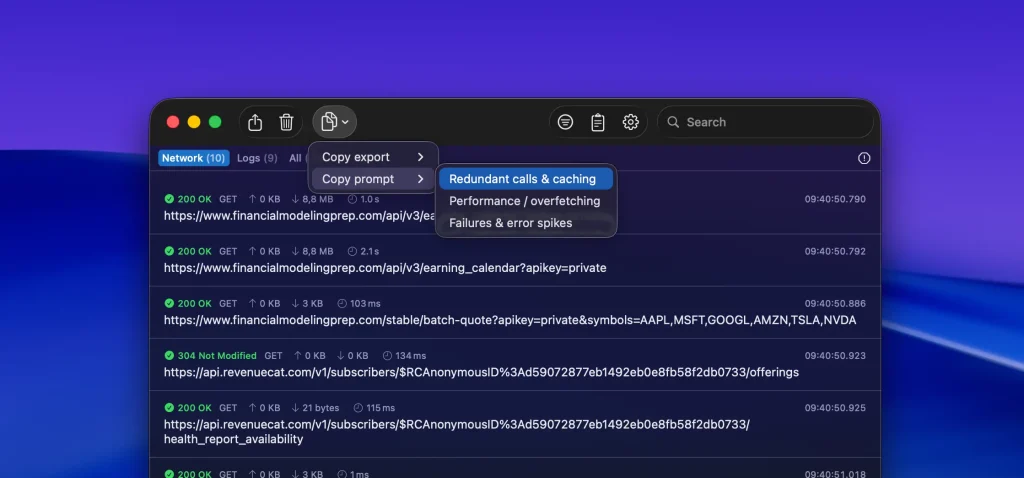
Copy export options
Copy export creates a minimal representation of the filtered traffic so it stays readable and token-efficient when pasted into an AI tool.
You can export:
- Minimal (redacted) for a compact request summary
- Minimal + JSON schema (if any) when you also want a lightweight schema summary of JSON responses
RocketSim intentionally keeps the export lean so you can focus on debugging patterns instead of scrolling through full payload dumps.
Built-in prompt templates
Copy prompt creates a more guided prompt for common network debugging tasks. RocketSim currently includes:
- Redundant calls & caching to detect duplicate requests, deduplication opportunities, and missing cache strategy
- Performance / overfetching to spot slow endpoints, oversized payloads, and opportunities to trim fields
- Failures & error spikes to focus on non-2xx responses and likely causes such as authentication, validation, rate limits, or backend issues
Because the prompt is built from the current filters, you can narrow the analysis first by app or time range and then copy a much more focused prompt.
Prompting an AI Agent using Network Requests structured data
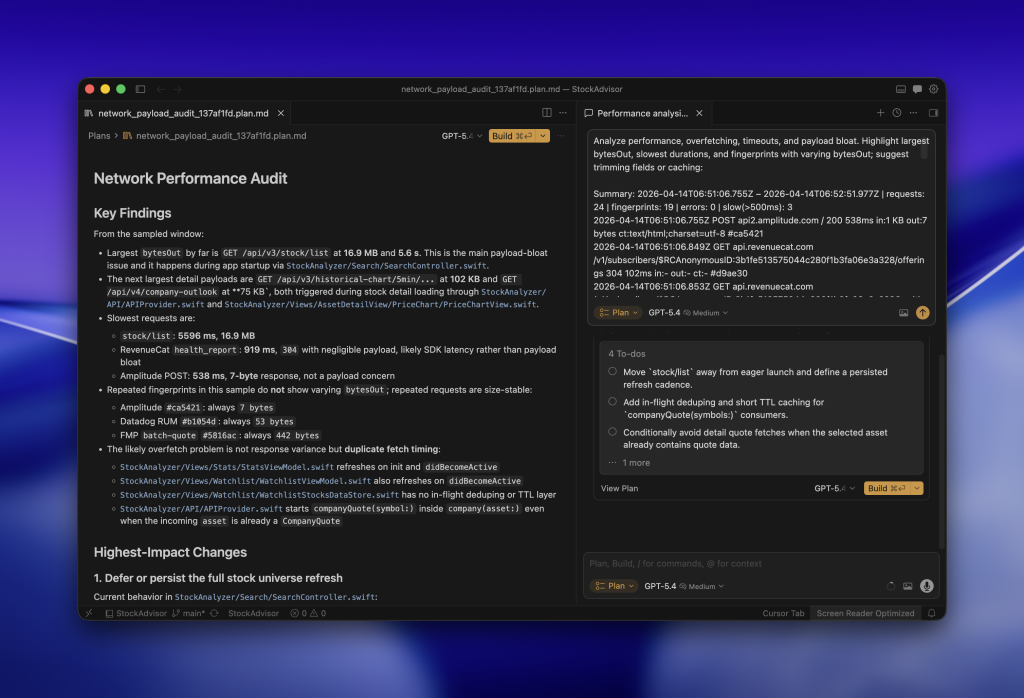
I love using Cursor for agentic development, but this works with any IDE of choice. In the above example, I copied the following prompt:
Analyze performance, overfetching, timeouts, and payload bloat. Highlight largest bytesOut, slowest durations, and fingerprints with varying bytesOut; suggest trimming fields or caching:

Summary: 2026-04-14T06:51:06.755Z – 2026-04-14T06:52:51.977Z | requests: 24 | fingerprints: 19 | errors: 0 | slow(>500ms): 3
2026-04-14T06:51:06.755Z POST api2.amplitude.com / 200 538ms in:1 KB out:7 bytes ct:text/html;charset=utf-8 #ca5421
2026-04-14T06:51:06.849Z GET api.revenuecat.com /v1/subscribers/$RCAnonymousID:3b1fe513575044c280f1b3fa06e3a328/offerings 304 102ms in:- out:- ct:- #d9ae30
...
I left out some of the requests, but you get the idea. It has a token-optimized output for network requests and uses structured data that’s easier for agents to digest. It contains only the bare minimum needed for the task at hand. In this case, performance metrics include data such as request duration and response size.
Smart fingerprinting
You might notice that each request comes with a fingerprint:
- 2026-04-14T06:51:06.755Z POST api2.amplitude.com / 200 538ms in:1 KB out:7 bytes ct:text/html;charset=utf-8 #ca5421
In this case, it’s #ca5421. These fingerprints allow agents to more easily detect duplicate endpoint requests, which can drain performance. Duplicate requests could indicate caching opportunities or code optimization potentials.
The benefit of bringing a code base together with real networking data
The above example demonstrates the power of combining Network Requests data with your project’s code. An agent can indicate actual pieces of code that can be optimized for better performance.
If a request is fired twice, the agent could suggest a way to prevent it from happening. Either by introducing caching or by not firing the duplicate requests at all. It’s all about giving your agents eyes.
Get started today
RocketSim is available in the Mac App Store, and you can get started for free. It’s used by 80K+ developers and 250+ teams every single year. You can learn about all 30+ of its features on rocketsim.app.
Enjoy!