

Agent hooks are small scripts that your agent tool runs automatically when something happens, like right before a shell command or when the agent finishes. Claude Code hooks, Cursor hooks, and Codex hooks all work this way, and they are the most reliable way to make sure a rule is followed every time.
I use hooks to keep Xcode build logs out of my agent’s context, or to compound learnings automatically. Before, I relied on AGENTS.md files, but in my experience, hooks are way more reliable. In this article, I’ll explain how agent hooks work, how the three tools differ, and how you can set one up yourself.
Why instructions are not enough
Not long ago, I relied on a rule in my global instructions that told my agent to filter Xcode build output, so it would only see errors, warnings, and test results. It’s a good rule, but it’s still a sentence the agent reads. An agent can forget what it reads, and I experienced that myself: it wasn’t reliable at all.
Everything in AGENTS.md, agent skills, and your global instructions ends up in the context of your agent. The agent decides what to do with it, and it usually follows it, but it doesn’t have to. I wrote about moving rules into reusable skills before, and the guide on writing an AGENTS.md explains what belongs in there. Neither of them can guarantee a rule is followed.
A hook works differently:
- An instruction.
The agent reads it and can ignore or forget it. It works through the model. - A hook.
Your tool runs a script at a fixed moment, every time. It works around the model.
This means hooks are for the rules that only pay off when they are followed every time. The instruction still explains what you want, and the hook makes sure it happens.
How agent hooks work
If you know webhooks, the idea is similar: something happens, and something you defined runs. A webhook sends an HTTP request to a URL, while an agent hook most commonly runs a script on your own machine. Every hook has four parts:
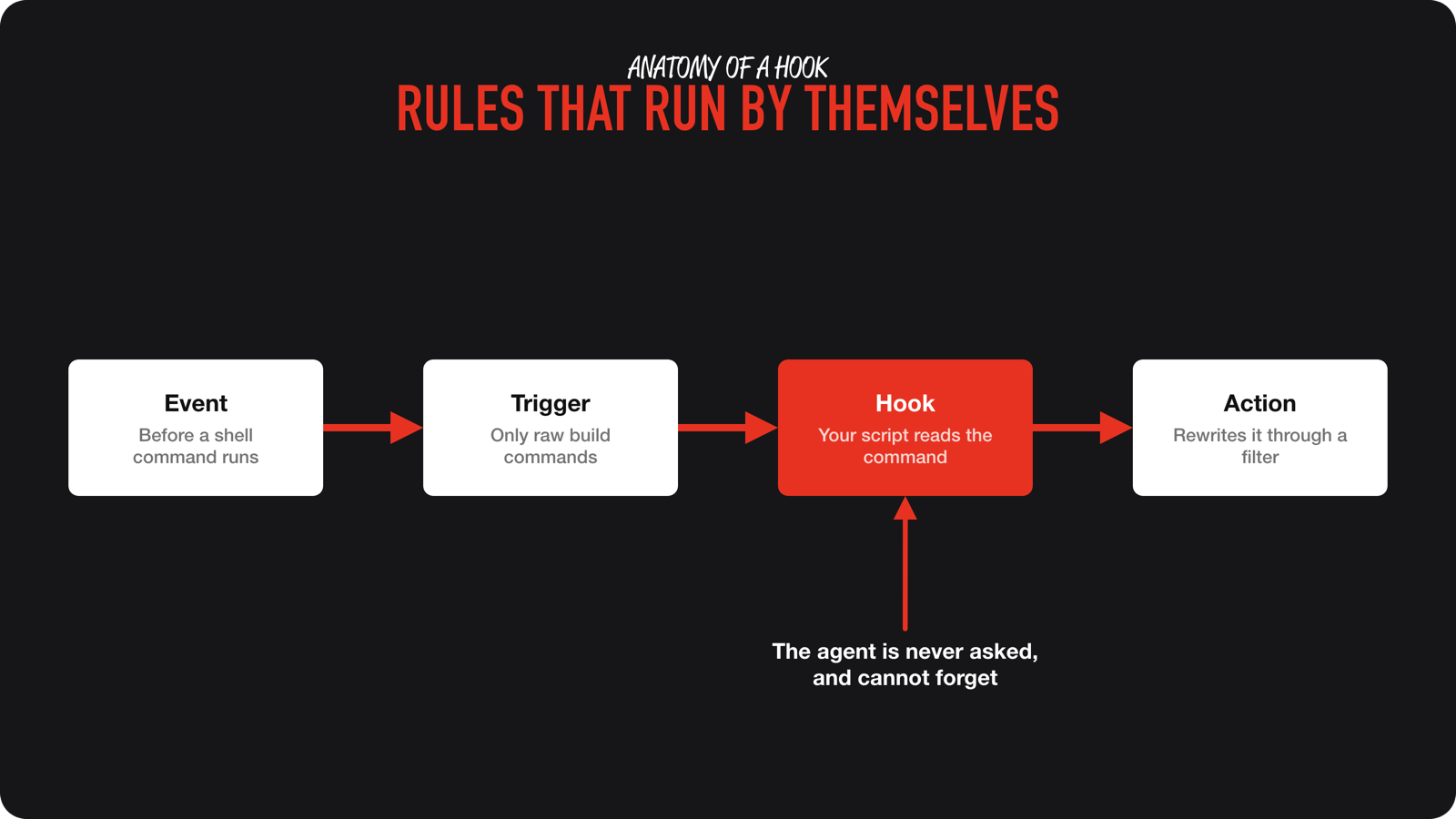
- The event.
A defined moment in the agent’s work, like the agent being about to run a shell command, a turn that ended, or a session that started. - The trigger.
A filter on that event. A hook that only cares about shell commands ignores everything else. - The hook.
Your script. It receives the details of the event as JSON on stdin. - The action.
What your script asks the tool to do with the result, like adding context, changing the command, or denying it.
A rule of thumb: a hook that runs before something happens can usually block or change it. A hook that runs after can’t undo what already happened. This makes sense if you think about it, but it’s a great distinction that helps me remember the differences.
Claude Code, Cursor, and Codex hooks compared
The idea is the same in all three tools, but names and configuration files differ. Learn the idea once, and check the documentation of your tool for the exact details: Claude Code hooks, Cursor hooks, and Codex hooks.
| Claude Code | Cursor | Codex | |
|---|---|---|---|
| User configuration | ~/.claude/settings.json | ~/.cursor/hooks.json | ~/.codex/hooks.json or config.toml |
| Project configuration | .claude/settings.json | .cursor/hooks.json | .codex/hooks.json or config.toml |
| Before a tool runs | PreToolUse | preToolUse, beforeShellExecution | PreToolUse |
| After a tool ran | PostToolUse | postToolUse, afterFileEdit | PostToolUse |
| Agent finished | Stop | stop | Stop |
| Block a call | Exit code 2 or JSON permissionDecision: "deny" | Exit code 2 or JSON permission: "deny" | Exit code 2 or JSON permissionDecision: "deny" |
| Hook fails | Call goes ahead, unless onFailure is "block" | Call goes ahead, unless failClosed is true | Reported as a hook failure, so test what your event does |
There are a few more differences worth knowing:
- Claude Code and Codex use the same configuration shape: an event, a matcher, and a list of handlers. Cursor uses a flatter
hooks.jsonwith aversionand acommandper hook. - The tool you filter on is named
Bashin Claude Code and Codex, andShellin Cursor. - Codex asks you to review and trust a hook before it runs, and it only loads project hooks from a trusted project. Cursor also runs project hooks only in a trusted workspace.
- All three tools have more events than the table shows, like the start and end of a session, before a prompt is sent, and before and after a subagent runs.
Example: a hook that filters Xcode build output
Raw xcodebuild output is long, and your agent rarely needs all of it. I covered the numbers in How to reduce token usage in Claude Code, Codex, and Cursor. Piping the build through xcsift keeps errors, warnings, and test results and drops the rest.
I started creating this hook after I found out that my raw build logs were often still ending up in my context. I needed a more reliable way to filter xcodebuild output, without maintaining scripts across all my projects.
My own hook rewrites the command in Cursor and Claude Code. The version below is simplified: it blocks a raw build and tells the agent how to run it instead, which works the same way in all three tools. Save it as ~/.agents/hooks/require-xcsift.sh and make it executable with chmod +x:
#!/bin/bash
input=$(cat)
command=$(jq -r '.tool_input.command // empty' <<< "$input")

# Only act on raw build and test commands that aren't filtered yet.
if [[ "$command" == *xcodebuild* \
   && "$command" =~ (^|[[:space:]])(build|test)([[:space:]]|$) \
   && "$command" != *xcsift* ]]; then
  message="Run it again as: set -o pipefail; $command 2>&1 | xcsift -f toon -w"

  # Cursor answers with JSON, Claude Code and Codex read stderr after exit code 2.
  if jq -e 'has("cursor_version")' <<< "$input" > /dev/null; then
    jq -n --arg message "$message" '{permission: "deny", agent_message: $message}'
    exit 0
  fi

  echo "$message" >&2
  exit 2
fi

exit 0
The script leaves everything else alone, including commands that already use xcsift and xcodebuild -list. If jq is missing or the input looks unexpected, it exits without blocking anything. That’s called failing open, and it’s the right choice for a convenience hook. A broken hook shouldn’t stop you from working.
Register it in Claude Code in ~/.claude/settings.json. Codex uses the same shape in ~/.codex/hooks.json:
{
  "hooks": {
    "PreToolUse": [
      {
        "matcher": "Bash",
        "hooks": [
          {
            "type": "command",
            "command": "~/.agents/hooks/require-xcsift.sh",
            "timeout": 5
          }
        ]
      }
    ]
  }
}
In Cursor, add it to ~/.cursor/hooks.json:
{
  "version": 1,
  "hooks": {
    "preToolUse": [
      {
        "command": "~/.agents/hooks/require-xcsift.sh",
        "matcher": "Shell",
        "timeout": 5
      }
    ]
  }
}
You don’t need to write this configuration by hand. Your agent can read the documentation of your tool and do the setup. Ask it to explain before it writes:
I want to add a hook to the agent tool I'm using right now.
First read the hooks documentation for this tool and tell me which events it supports.
Then help me with this idea: <describe the event and what should happen>.
Propose the event, the trigger, and the script before you write anything.
Make the script fail open, give it a short timeout, and explain how I can test it.
Don't enable it before I've read the script.
Other hooks I run
Hooks come in different shapes. These are the other ones on my machine:
- The compound hook.
It runs when the agent finishes a turn. After at least 10 finished turns and at least two hours since the last run, it sends a follow-up message that sends the agent to updateAGENTS.md. It can only add a message, and it can’t block anything. - Worktree cleanup.
Every agent worktree builds into its own DerivedData folder, so old worktrees take up disk space. Hooks check for old worktrees when a session starts and after a shell command that mentions worktrees. Today, the cleanup only reports what it would remove. My tool has no event for removing a worktree, so a scheduled job runs the same script every hour and the hooks only make it faster. I wrote about the disk space side in How to free up Xcode disk space safely with an AI agent. - A session recorder.
In one project, a hook runs when a session ends and writes a small record of the session to a file, so I can analyze my sessions later. It doesn’t change anything about the agent’s work.
Documentation often lists formatters after edits, blocks on dangerous commands, and notifications when the agent needs you. Most of those are not hooks I run myself. I think that says something: I often tell myself that a task only costs ten seconds, so I don’t automate it. But once you notice you do something regularly, a hook is a way to automate it without having to remember it.
Be careful with hooks
A hook is a script that runs on its own, with your permissions. That makes it powerful, and it needs some care:
- Read before you enable.
A hook that comes with a repository or a plugin is a script that runs on your machine. Treat it like any other script you download. - Choose fail open or fail closed on purpose.
My build hook fails open. A hook that guards something dangerous should deny when it breaks, which you can configure withfailClosedin Cursor andonFailurein Claude Code. In Claude Code, a hook that times out doesn’t block the tool call either unless you ask it to. - Keep hooks fast.
The agent waits for the hook. The hooks I configured at user level all have a timeout of five seconds. - Limit hooks that keep the agent going.
A hook that sends a follow-up message at the end of a turn can start itself again. Cursor limits stop hooks withloop_limit, which defaults to 5. Check what your tool does. - Don’t treat a hook as the only guard.
Some paths skip hooks. In Codex, for example, aPreToolUsehook doesn’t run again when the agent polls a command that already passed it.
Frequently asked questions
Agent hooks are scripts that your agent tool runs automatically when a certain event happens, like before a shell command runs or when the agent finishes its turn. The agent is not asked whether it wants to run them, so a hook works even when the agent would have forgotten a rule.
AGENTS.md is read by the agent as context, and the agent decides what to do with it. A hook is code that your tool runs at a fixed moment. Use AGENTS.md to explain what you want, and a hook for the rules that have to be followed every single time.
No. A skill is something you or the agent calls by name or by description. A hook is triggered by an event, without anyone calling it.
Yes. A hook that runs before a tool call can usually block or change it. In Claude Code, Cursor, and Codex, a hook that exits with code 2 blocks the call. A hook that runs after something happened can't undo it.
Conclusion
Instructions are suggestions, and hooks are what actually rewrite or block an action. Every hook has an event, a trigger, a script, and an action. The names and configuration files differ between Claude Code, Cursor, and Codex, so link to the documentation of your tool and let your agent do the setup. Start with something you repeat, read every script before you enable it, and fail open unless the hook guards something dangerous.
If you want to learn where each rule should live in your setup, the AI Fundamentals course covers AGENTS.md, skills, hooks, and MCPs step by step in module 6.
Feel free to contact me or tweet me on Twitter if you have any additional tips or feedback. Which rule does your agent forget most often?
Thanks!


