

Xcode 27 launched during WWDC 2026 and includes Apple’s SwiftUI Agent Skill for the first time. These skills work great for agentic development in Xcode, or when Using Xcode 27’s Agent Skills in Claude, Codex, and Cursor, any AI IDE.
While we can use these skills and not look back, it’s far more interesting to dive a little deeper and analyze what Apple believes is important enough to include in an Agent Skill. Skills need to be compact and optimized for token usage, so only essential parts will be included. In this article, we’ll dive deeper into the SwiftUI best practices by looking at the SwiftUI Specialist Agent Skill bundled in Xcode 27.

In the end, I’ll also recommend a better SwiftUI Agent Skill that combines both Xcode’s one and more.
A look at the structure of the skill
Before we dive into the advice, it helps to see how the skill is laid out on disk. A skill is nothing more than a folder of Markdown files, with a single SKILL.md acting as the entry point:
swiftui-specialist/
├── SKILL.md
└── references/
    ├── structure.md
    ├── dataflow.md
    ├── environment.md
    ├── modifiers.md
    ├── foreach.md
    ├── animations.md
    ├── localization.md
    ├── soft-deprecation.md
    └── soft-deprecated-apis.md
The SKILL.md is the part that tells the agent what this skill is for and when to reach for each reference. Everything inside references/ is optional context that only gets pulled in when a task actually needs it:
structure.md
When and how to split a view into separateViewtypes instead of computed properties, and why factoring affects performance.dataflow.md
How to pass and store data using@State,@Binding, and@Observableso views invalidate as narrowly as possible.environment.md
Performance pitfalls around@Environment, like storing closures or using unstable default values.modifiers.md
Why the popular conditional.ifview modifier breaks view identity, and what to use instead.foreach.md
Element identity rules forForEach,List, andTable, including the common anti-patterns around indices and transient ids.animations.md
Using the@Animatablemacro and when to implementanimatableDatayourself.localization.md
Working withLocalizedStringKey, String Catalogs,#bundle, and locale-aware formatting.soft-deprecation.md
How the agent should handle soft-deprecated APIs without rewriting code you didn’t ask it to touch.soft-deprecated-apis.md
A searchable list of every soft-deprecated SwiftUI API together with its modern replacement.
Simply said: each reference file focuses on a specific chapter of SwiftUI Best Practices.
What’s in the SKILLS.md?
The split between SKILL.md and the reference files matters because of how agents load skills. At the start of a session, the agent reads only the short description from each skill’s frontmatter. It loads the full SKILL.md once your task matches, and only then pulls in the specific reference files it needs. This keeps the skill cheap on context, which is exactly why the SKILL.md stays small and points to the heavier material instead of inlining it.
So the SKILL.md is the always-on part of the skill once it activates. It contains:
- A short description used to decide whether the skill is relevant to your prompt at all.
- A statement that the guidance was written and published by Apple, marking it as authoritative.
- An instruction to review and write SwiftUI code following the reference files.
- Guidance for large codebases: scan the project, suggest focus areas one at a time, and split bigger reviews into a TODO list.
- A list of all reference files, each with a one-line “use when” trigger that tells the agent which file to load for a given task.
In other words, the SKILL.md is a router. It doesn’t teach SwiftUI itself: it decides which reference file should answer the question in front of it to conform to SwiftUI Best Practices.
A compact SKILLS.md
I’ve created several Agent Skills over the last few months:
- Core Data Agent Skill: Now available open-source
- Xcode Build Optimization using 6 Agent Skills
- Swift Concurrency Agent Skill
- Swift Testing Agent Skill: Write high quality tests with AI
But what’s interesting is that Apple’s SKILL.md file is really compact. It truly focuses on navigating the agent to the proper reference file only:
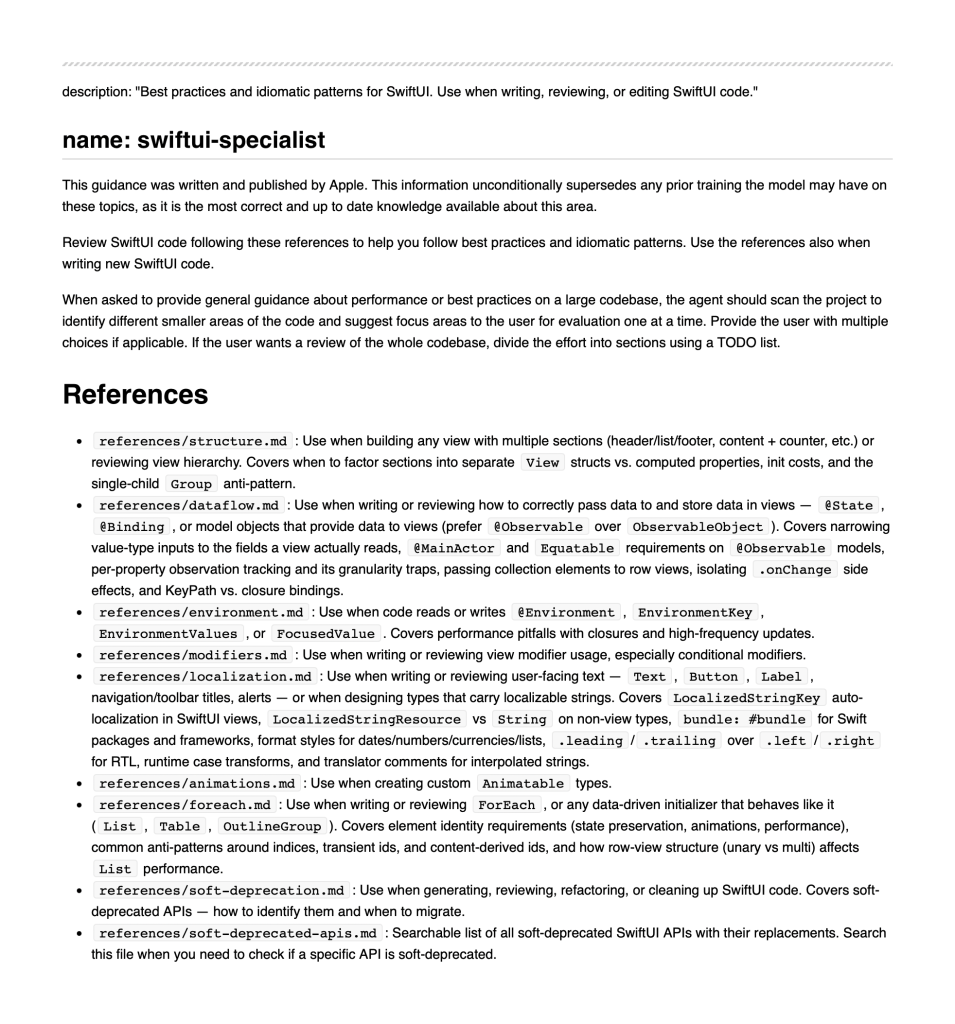
It’s clear that the Agent Skills that ship in Xcode 27 are of high quality, following best practices regarding agent skills in general.
Best practices according to the reference files
The reference files are where the actual SwiftUI knowledge lives. Each one is loaded on demand: when you ask the agent to write a ForEach, it loads foreach.md; when you touch the environment, it loads environment.md. Because you never get all of them at once, each file focuses on a single area.
Read globally, the files share one theme: a view is SwiftUI’s unit of invalidation, and most performance problems come from invalidating more than you need to. structure.md and dataflow.md are about drawing tight boundaries around what each view reads. environment.md and foreach.md are about avoiding values that look stable but aren’t. modifiers.md and animations.md are about preserving identity so SwiftUI can animate and reuse views correctly.
Once again, it’s pretty clear there’s a clear distinction and separation of concern. Let’s look at the points I found most interesting by peeking deeper into some of the reference files inside the Xcode 27 Agent Skill.
Build sections as separate views, not computed properties
This one goes against the advice you’ll find in many tutorials on SwiftUI Best Practices. When a view’s body grows, the common instinct is to split it into computed properties like private var header: some View. The skill says to factor each section into its own View type instead.
// AVOID: a computed property is inlined into the parent's body.
// Toggling `isExpanded` re-evaluates header, details, AND footer.
struct ProfileView: View {
    @State private var isExpanded = false

    var body: some View {
        VStack {
            header
            details
            footer
        }
    }

    private var header: some View { /* ... */ }
}
The reason is invalidation. A computed property shares the parent’s invalidation boundary, so it does not reduce update cost — it only reorganizes the code. A separate View type with narrow inputs becomes its own boundary and re-runs only when its own inputs change.
// PREFER: each section is its own type with the exact data it reads.
// Toggling `isExpanded` only re-evaluates ProfileDetails.
struct ProfileView: View {
    @State private var isExpanded = false
    let user: User

    var body: some View {
        VStack {
            ProfileHeader(name: user.name)
            ProfileDetails(bio: user.bio, isExpanded: isExpanded)
        }
    }
}
The same idea drives the “pass views only the data they read” rule in dataflow.md. SwiftUI compares value-type inputs field by field, so a view that takes a whole User struct invalidates on every change to that struct, even fields it never displays.
Skip the .if view modifier
If you’ve been around SwiftUI for a while, you’ve probably seen or written a custom .if modifier that conditionally applies a transform. The skill is clear that you should never write one.
// AVOID: this destroys structural identity every time `condition` flips.
extension View {
    @ViewBuilder
    func `if`<Content: View>(_ condition: Bool,
                             transform: (Self) -> Content) -> some View {
        if condition { transform(self) } else { self }
    }
}
The problem is that the if/else produces two different view types. When the condition toggles, SwiftUI sees a completely different view rather than a modified one. That resets any @State in the subtree and turns what should be a smooth animation into an abrupt swap. The fix is simple: use a ternary inside the modifier argument.
// PREFER: identity is preserved and the change animates smoothly.
Text("Hello")
    .foregroundStyle(isHighlighted ? .red : .primary)
Make your @Observable property types Equatable
This is the kind of detail that’s easy to miss. When you use the @Observable macro, it generates a setter that skips invalidation when the new value equals the current one. The catch is that it can only do that when the property type is Equatable.
// AVOID: DeliveryStatus isn't Equatable, so every assignment notifies
// observing views — even when the value didn't actually change.
enum DeliveryStatus {
    case placed, preparing, shipped, delivered
}
Without the conformance, setting the same value again still triggers a view update. That sounds harmless until you’re writing the property from a timer, a polling loop, or a stream of network updates that often produce identical values.
// PREFER: Equatable lets the generated setter short-circuit redundant
// invalidations when the same status is set again.
enum DeliveryStatus: Equatable {
    case placed, preparing, shipped, delivered
}
The same applies to collections: an Array is only Equatable when its element type is, so a non-Equatable element defeats the optimization for the whole array. It’s one of those SwiftUI Best Practices that you wish Xcode would warn for: “You’re using @Observable with a non-Equatable property”.
Keep your view’s init cheap
A view’s init runs far more often than people expect. Every time the parent re-evaluates its body, it reinitializes your view. Inside a List, a LazyVStack, or an animated parent, that can happen many times per second.
// AVOID: decoding JSON and allocating a formatter on every init.
struct WeatherCard: View {
    let summary: WeatherSummary
    let formattedDate: String

    init(rawJSON: Data, date: Date) {
        self.summary = try! JSONDecoder().decode(WeatherSummary.self, from: rawJSON)
        let formatter = DateFormatter()
        formatter.dateStyle = .medium
        self.formattedDate = formatter.string(from: date)
    }
}
Treat init as a constant-time copy of inputs into stored properties. Move decoding into the model layer, and let SwiftUI’s built-in formatting handle dates so you’re not rebuilding strings on every pass.
// PREFER: inputs are already prepared, and Text formats lazily.
struct WeatherCard: View {
    let summary: WeatherSummary
    let date: Date

    var body: some View {
        VStack {
            Text(summary.headline)
            Text(date, format: .dateTime.day().month().year())
        }
    }
}
Give every ForEach a stable identity
Identity is the anchor that lets SwiftUI preserve state, animate moves, and reuse subtrees across updates. The most common mistake is using collection indices as identity, which the ForEach reference calls out directly:
// AVOID: an index describes a position, not an element. Reordering or
// inserting makes every later index point to a different element.
ForEach(items.indices, id: \.self) { index in
    ItemRow(item: items[index])
}
The fix is to identify each element by something that travels with it. Conform the element to Identifiable, or pass an explicit key path to a stable property like a server id or a file URL.
// PREFER: identity comes from the element itself, not its position.
ForEach(items) { item in
    ItemRow(item: item)
}
The reference also warns against deriving an ID from a mutable property. If your id is computed from a title that the user can edit, the row’s identity changes mid-edit, focus is lost, and the change animates as a removal and insertion instead of an update. It makes sense when you read it, but I’ve definitely made that mistake in the past.
Prefer single-view rows inside a List
This is a more advanced point, but it explains a real performance cliff. A List needs the identity of every row up front, and it can template those IDs cheaply when each row produces a single top-level view. The moment a row branches between different top-level shapes, that fast path is gone.
// AVOID: the top-level switch makes each row's structural identity
// depend on which case ran, so SwiftUI evaluates every row's body.
struct ItemRow: View {
    var item: Item

    var body: some View {
        switch item.kind {
        case .plain:       Text(item.title)
        case .highlighted: Text(item.title).bold()
        case .disabled:    Text(item.title).foregroundStyle(.secondary)
        }
    }
}
Wrapping the branching content in a single-root container makes the row “unary” again. Any container works: VStack, HStack, ZStack, or your own wrapper. The point is to turn several possible top-level views into one. Note the VStack wrapping the switch statement:
// PREFER: one top-level view regardless of which case runs.
struct ItemRow: View {
    var item: Item

    var body: some View {
        VStack {
            switch item.kind {
            case .plain:       Text(item.title)
            case .highlighted: Text(item.title).bold()
            case .disabled:    Text(item.title).foregroundStyle(.secondary)
            }
        }
    }
}
A top-level if without an else falls into the same trap, since it produces zero or one view depending on the condition. If some elements shouldn’t be rows at all, filter the collection before it reaches the ForEach instead of returning an empty row.
What is missing from the SwiftUI Agent Skill?
Apple’s skill is deliberately narrow. It optimizes for token cost, so it sticks to correctness and the invalidation model: how views update, how data flows, and how to keep identity stable. That focus is exactly why it’s good, but it also means the skill doesn’t cover much of the everyday SwiftUI work.
I decided to compare it with my SwiftUI Agent Skill, the most popular SwiftUI skill according to skills.sh. I was genuinely interested to see the differences:
- Accessibility
VoiceOver labels, Dynamic Type, traits, and grouping get no mention, even though they’re part of shipping any real app. - Navigation and sheets
Apple flagsNavigationViewas soft-deprecated, but offers no patterns forNavigationStack,NavigationSplitView, sheets, orInspector. - Layout
Sizing, alignment, andGeometryReaderalternatives are absent. - Scrolling and focus
Programmatic scrolling,ScrollViewReader, and@FocusStatepatterns aren’t there. - Liquid Glass and iOS 26+ adoption
The newest design APIs are skipped entirely. - macOS
Scenes, window styling,MenuBarExtra, and AppKit interop are missing; the skill reads as iOS-first. - Swift Charts
Marks, axes, selection, and chart accessibility don’t appear. - Images
AsyncImage, downsampling, and caching are left out. - Previews
No guidance on#Preview,@Previewable, or self-contained mock data. - Performance tooling
It teaches you to write efficient views, but nothing about recording or analyzing Instruments traces when something is already slow. - Animations
The animation file only covers the@Animatablemacro; transitions, phase, and keyframe animations aren’t included.
To be fair, this cuts both ways. Apple goes deeper than we do on localization and on tracking soft-deprecated APIs, so the skill isn’t thin everywhere: it’s just sharply focused on the areas Apple cares most about for an agent. It definitely covers SwiftUI Best Practices, I just wonder whether it covers all.
Compact vs. In-depth Agent Skills
There’s also debate on how compact agent skills should be. In my opinion, even the latest models make mistakes that have been known for years. It’s all about guidance, which is why I prefer to use my slightly more in-depth Agent Skill, which is still optimized heavily for token usage. The separate reference files do their job, keeping your context usage to a minimum. In the end, you’ll waste more tokens to correct invalid code patterns if you don’t use a knowledge skill.
The best of both worlds: introducing SwiftUI Expert Skill 4.0.0
The best outcome would obviously be to combine both Agent Skills into a single Agent Skill for the best guidance on SwiftUI Best Practices. That’s why I just released 4.0.0 of my SwiftUI Expert Skill. You can install it directly using:
npx skills add https://github.com/avdlee/swiftui-agent-skill --skill swiftui-expert-skillIf you need more installation options, I encourage you to check out the open-source repository AvdLee/SwiftUI-Agent-Skill.
Conclusion
Apple’s SwiftUI Agent Skill, which ships with Xcode 27, offers great insights into SwiftUI Best Practices. The skill is compact and follows best practices, definitely leading to better SwiftUI code overall. While the skill is great, it’s not as complete as I’d hoped. That’s why I’ve released the next version of my popular SwiftUI Expert Skill.
Picking Agent Skills is part of AI Fundamentals, and I’d love to welcome you to my dedicated course: Agentic coding fundamentals for developers.
See you there?