

A Model Context Protocol (MCP) can be invaluable when used properly, especially when talking about product optimizations. I’ve personally been playing around with it for a while now, and feel like I need to share my learnings due to the impact it has.
In this case, I’ve been using it to optimize RocketSim. It didn’t only optimize the product itself, it also makes sure I’m focusing on the right things. By giving my agents eyes, I no longer guess what I should be working on.

What is a Model Context Protocol (MCP)?
Model Context Protocol (MCP) is an open standard that connects AI assistants to external tools and data sources. Think of it as a USB-C port for AI: a single, standardized interface that lets any compatible AI model communicate with a compatible service. Instead of building custom integrations for every combination of AI model and tool, you define your tools once using MCP, and any AI assistant can use them.
Common examples of MCP usage include allowing your AI coding assistant to query a database, search your project management tool, or call an API. You can set up an MCP server to expose specific capabilities, like fetching Sentry errors or querying Amplitude analytics. The latter is exactly what I want to discuss in more detail in this article.
Giving agents access to both your code and analytics
Your agents already have access to your codebase. This is a goldmine for insights, and the reason why they can help you so much. Lately, agents have been better at understanding my codebase than I do myself (not always, though 😉 ).
Whenever I’m coding, I’m trying to identify slow processes in my workflow. Coding is obviously solved, but I still found myself digging through analytic charts manually. The chart navigation itself is not only time consuming, opening the browser, creating and maintaing the charts are as well. On top of that, while I’m familiar with metrics and product optimization from my time at WeTransfer, I’m definitely not an expert.
Since I’m using Amplitude for RocketSim, I’ve been able to leverage their MCP. After setting up, my agents can basically query all data for a given project. It depends a bit whether your tracking provider offers an MCP too, but you can always see if there’s a public API to convert into a script, tool, or MCP manually yourself.
FREE 5-Day Email Course: The Swift Concurrency Playbook
A FREE 5-day email course revealing the 5 biggest mistakes iOS developers make with with async/await that lead to App Store rejections And migration projects taking months instead of days (even if you've been writing Swift for years)
Product decision prompts
After connecting your analytics provider with an agent, you can consistently involve it in any decision you make. You could even strictly ask the agent before working on a big feature:
Check out the Amplitude MCP and tell me whether it makes sense based on data to work on feature X
Here’s an actual prompt that I recently triggered from the couch. Yes, that’s another benefit: you can hook up MCPs to e.g. Claude and directly answer questions in your mind using actual data. Here’s the prompt:
Analyze all data now as a conversion expert and tell me the highest impact change I can likely do. Reference docs.rocketsim.app to learn more about the app and turn yourself in an expert
The outcome looked as follows:
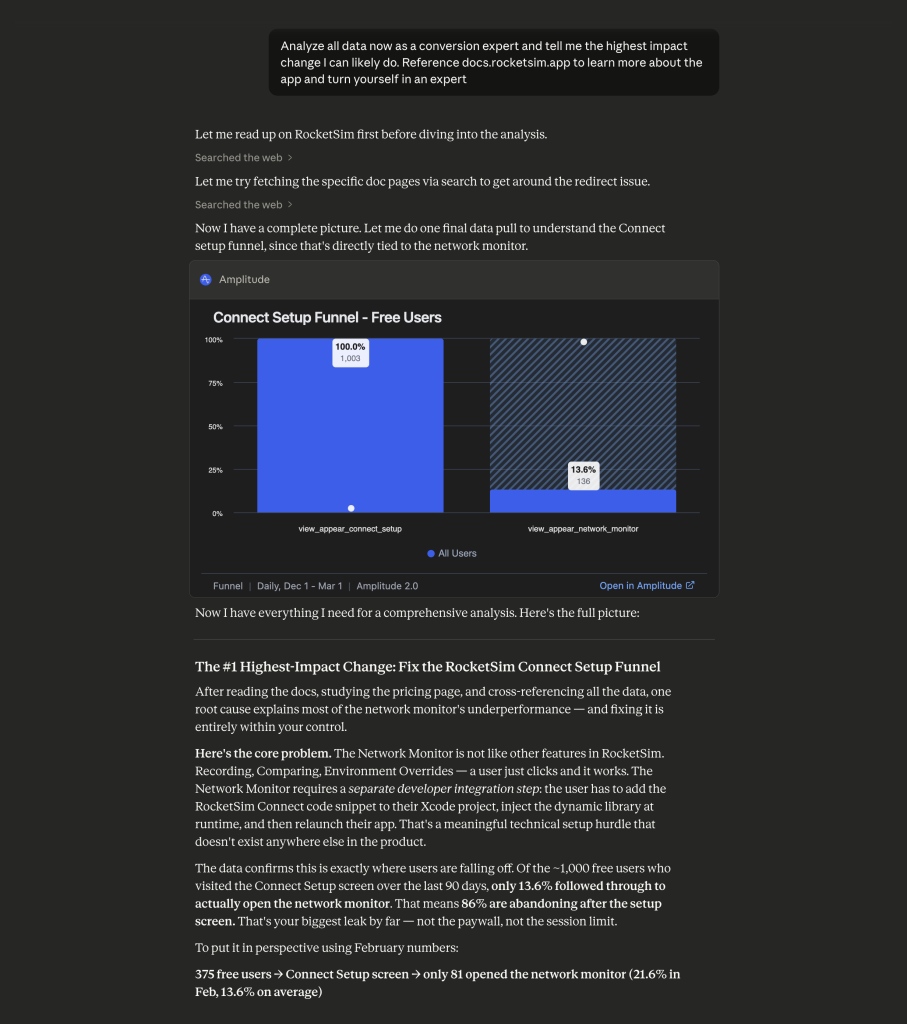
It gave me a clear focus point to work on, proven by actual numbers. It even included an inline, interactive chart, which is truly fantastic.
The benefit of having both code and analytics access
Whenever I work on a bug using a Diagnostics Report or email feedback, I can now ask my agent:
Verify, using the Amplitude MCP, whether this feature is well-enough tracked. Create a plan to improve tracking and debug logging for our Diagnostics report.
This allows me to keep both tracking and debug logging up to date way more easily. The agent can review my codebase and compare it against the actual analytics data.
Combining Agent Skills and MCPs
It becomes even more fun when you combine Agent Skills with the MCPs you’ve installed. For example, I love the Marketing Skills, and especially the Marketing Psychology one. You can ask your analytics MCP to find underperforming upsells and use the marketing psychology skill to improve accordingly.
Here’s the complete raw prompt that I used this morning:
@RocketSim/Views/Floating Thumbnails/Thumbnail Views/UserEngagement/BecomeProThumbnailView.swift Is made to upsell users that just created the recording. You can reference the amplitude MCP for insights into how well this one converts, how often it’s being shown, and more insights that can help you make the best possible implementation for this task, my goal is to increase conversion for recordings. The majority of free users focus on the recordings feature, so I feel like there’s an opportunity there.
Use /marketing-ideas and /marketing-psychology To come up with a better strategy here, and I also wonder whether we should potentially directly upsell users instead of showing the whole sales view. For example,@RocketSim/Views/Simulator Windows/Accessibility/VoiceOverNavigatorUpsellView.swift:48 Now directly suggests the user to start a trial. I think not even showing anything else.The question is if we show a Start Free Trial button but we don’t show anything about the pricing and such. Would users even press that button and continue, or do they, and then they see the price in the native alert from Apple, and that’s their decision point? I do think it’s better because it’s the shortest route to starting a trial, but maybe it’s not the most transparent one, so I’m keen to hear your thoughts.
And here’s the beginning of the plan that came out of it:
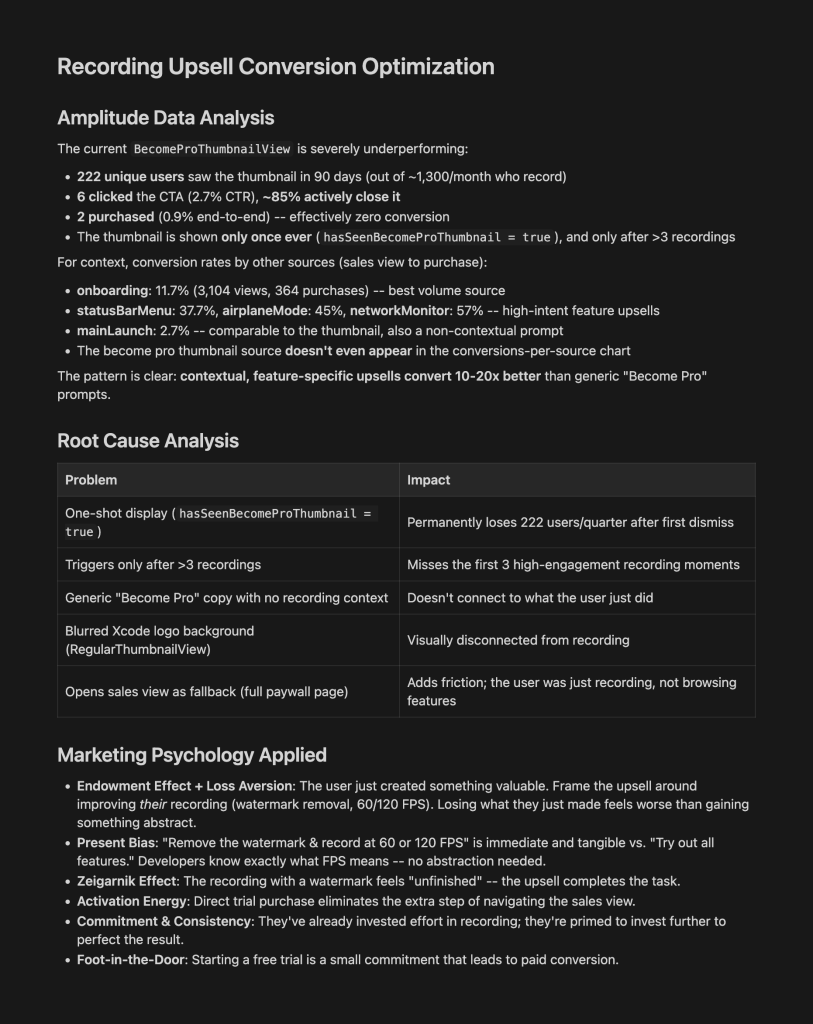
It’s bold and honest feedback, but my current upsell implementation wasn’t really effective. The good news is that it helps me improve it with clear reasoning.
Conclusion
Giving your agents eyes using a connected MCP can level up the impact you make on a daily basis. My planning prompts drastically improved, and I even found myself working more on things that actually matter based on real analytics data from Amplitude. The combination with Agent Skills leveled up prompts even more, and I can only imagine what it will bring for the future when I find even more valuable MCPs.
If you want to improve your AI development knowledge, even more, check out the AI Development Category page. Feel free to contact me or tweet me on Twitter if you have any additional tips or feedback.
Thanks!