

Apple launched Xcode 27 during WWDC’26, introducing a bunch of agentic development improvements, including official agent skills. As you’ve learned from my 9-Step Framework for Choosing the Right Agent Skill, it’s important to pick skills from authoritative sources. Apple absolutely counts like one, of course!
Official Agent Skills will impact how we build apps, whether with the new Xcode or with existing IDEs like Claude, Codex, or Cursor. I’ve earlier launched a SwiftUI Agent Skill to build better views with AI, but I’m honestly super happy to see an official alternative today.

Exporting Agent Skills to use with 3rd party IDEs
While the Agent Skills are already available in Xcode 27, you might want them to be available globally. Whether you use Codex, Claude, Cursor, or any other IDE that supports Agent Skills.
As part of the many improvements to Xcode, the team also introduced a new CLI tool called agent:
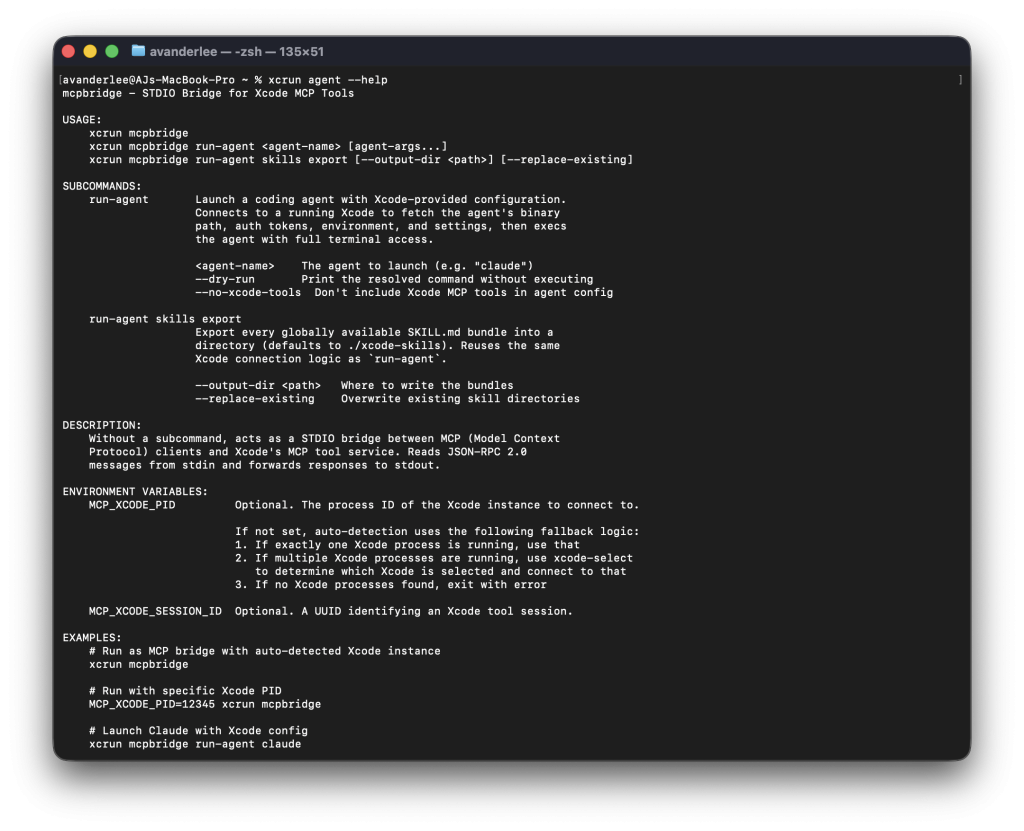
While the CLI is primarily focused on the Model Context Protocol that ships with Xcode, it now also lets you export the Agent Skills that come with Xcode.
Here’s how you can export the Xcode 27 Agent Skills to use in Claude, Codex, Cursor, or any other IDEs:
- Open the Terminal.app
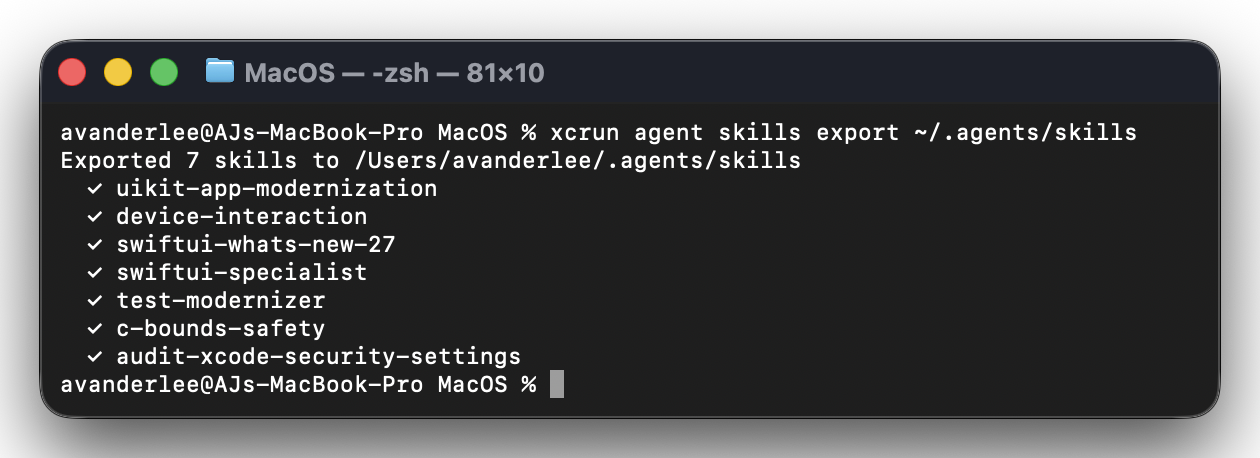
- Execute the command xcrun agent skills export ~/.agents/skills
Many popular Agent IDEs support the
~/.agents/folder to discover Agent Skills.
- Open your Agent IDE, refresh the skills if needed. If the skills don’t shop up, relaunch the IDE.
After you’ve successfully exported the agent skills, you’re ready to use them inside any IDE of your choice. For example, here’s the autocomplete inside Cursor:

The Agent Skills that ship with Xcode 27
After you’ve executed the command in the terminal, you’ll notice which Agent Skills are currently available inside Xcode 27. Important note: not all of these skills are useful outside of Xcode (more on this later).
avanderlee@AJs-MacBook-Pro MacOS % xcrun agent skills export ~/.agents/skills
Exported 7 skills to /Users/avanderlee/.agents/skills
  ✓ uikit-app-modernization
  ✓ device-interaction
  ✓ swiftui-whats-new-27
  ✓ swiftui-specialist
  ✓ test-modernizer
  ✓ c-bounds-safety
  ✓ audit-xcode-security-settings
You might get enthusiastic by reading just the names, but let’s also dive into a bit more details on what each does.
- uikit-app-modernization
Modernizes UIKit apps for multi-window environments by replacing legacy shared-state APIs likeUIScreen.mainandinterfaceOrientation. Handles scene lifecycle migration and asymmetric safe area insets across both Swift and Objective-C codebases. - device-interaction
Verifies your app’s behavior on a real device or simulator using screenshots, UI hierarchy inspection, and synthesized touch interactions. Runs as a subagent to confirm that features actually work and to catch visual or functional bugs. - swiftui-whats-new-27
Documents the new SwiftUI APIs, behaviors, and deprecations introduced across the 2027 OS releases (iOS, macOS, watchOS, tvOS, visionOS 27). Covers the@Statemacro migration, drag-to-reorder, new toolbar APIs, swipe actions, document-based apps, and other source-incompatible changes. - swiftui-specialist
Provides Apple’s authoritative best practices and idiomatic patterns for writing, reviewing, and refactoring SwiftUI code. Covers view structure, data flow, environment usage, modifiers, localization, animations,ForEachidentity, and soft-deprecated APIs. - test-modernizer
Migrates existing XCTest suites to Swift Testing and restructures older Swift Testing code to adopt newer features. Maps assertions to expectations, converts setUp/tearDown to init/deinit, and introduces traits, confirmations, and parameterized tests. - c-bounds-safety
Guides adoption of the C-fbounds-safetylanguage extension to prevent out-of-bounds memory access. Covers the language model, pointer annotations, compiler build settings, and runtime debugging of bounds violations. - audit-xcode-security-settings
Audits an Xcode project’s security posture and progressively enables hardening build settings, compiler warnings, and static analyzer checkers. Configures Enhanced Security entitlements and features like pointer authentication, typed allocators, and stack zero-initialization.
I expect future Xcode updates to ship new skills and updates to existing ones, so it’s recommended to run the command frequently.
Can I use all these skills without running them from inside Xcode?
Mostly, yes, but not all of them. A skill is really just a set of instructions, and instructions are only useful if the agent has the tools to act on them. The knowledge-driven skills like swiftui-specialist, swiftui-whats-new-27, and test-modernizer travel anywhere, since they only read and edit your source files. I happily use those in Cursor without Xcode running at all.
The exceptions are the skills that need to talk to something outside your code. audit-xcode-security-settings expects Xcode-specific tools to read and write build settings, so it degrades to manual .pbxproj edits elsewhere. And device-interaction is the clearest case: it drives a real device through tools only the Xcode 27 agent provides, so outside of Xcode there is simply nothing to call. My rule of thumb: if a skill only touches source files, it works everywhere; the moment it needs your project configuration or a running device, you’ll want to run it from inside Xcode.
Looking to control the Simulator with your agent? Check out Agentic Development with the Simulator.
Other popular Agent Skills to explore
If you’re new to Agent Skills, you might now be interested in finding out more Agent Skills to use. My way of finding skills is to use skills.sh, like this overview from my personal Agent Skills. If you want more background story on specific agent skills, here are a few related articles:
- Core Data Agent Skill: Now available open-source
- Xcode Build Optimization using 6 Agent Skills
- SwiftUI Agent Skill: Build better views with AI
- Swift Testing Agent Skill: Write high quality tests with AI
Or, if you’re new to replacing your AGENTS.md, you’ll enjoy this one: Agent Skills explained: Replacing AGENTS.md with reusable AI knowledge. Altogether, they complement the Agent Skills that come with Xcode 27.
Conclusion
Apple providing official Agent Skills is a blessing for the community. There’s still a place for 3rd-party agent skills open-sourced on GitHub, as Apple’s skills might be compact, not cover everything you need, or be outdated due to slower updates. It’s important to keep an eye on agents’ code results and determine whether there are gaps in the skills they use. Compiling learnings into open-source skills will be easier and faster than waiting for uncertain updates from the Xcode releases.
Picking Agent Skills is part of AI Fundamentals, and I’d love to welcome you to my dedicated course: Agentic coding fundamentals for developers.
See you there?