

Xcode build optimization ensures both your clean and incremental builds remain performant. New Xcode versions or WWDC announcements introduce new best practices that you need to apply to ensure having the best build performance.
While you might expect Xcode to apply new build settings automatically, the truth is you often have to enable them manually. A common example is Xcode 26’s compilation caching, which is opt-in-only at the time of writing this article. Build settings are only part of the problem, and altogether, I decided it’s time to create a new set of Agent Skills to help you all out.

The impact build durations on productivity
Improving your Xcode build performance by just 5 seconds will have a huge impact in the long run. Imagine doing 50 builds per day, you’ll be saving 5 minutes every single day. That’s 30 hours per year!
In case you’re sceptical: one of the early adopters saved even 20 seconds per build.
Influencing factors to look at for Xcode build optimization
Before we dive into the Agent Skill itself, I want you to have an idea of what can influence Xcode build times. First of all, there’s a difference between clean and incremental builds. The latter reuses the cache and is faster because it only has to compile the new changes. At least, that’s the idea, but depending on your project setup, it might recompile more than just that single file you’ve touched.
There’s also a thing called zero-change build duration. Spoiler: one of the early adapters of my new Agent Skill had a zero-change build duration of 70 seconds, which went down to 9 (-61s / 87% faster). This basically means that they’re now only spending 9 seconds waiting for a rebuild after nothing changed in the project all. Honestly, I’d expect only ~1 second if I didn’t change anything, but it shows how important it is to keep an eye on our build performance.
Other influencing parts are code complexity, build phases, Swift packages, and other build phases. For a detailed analysis of your project, I highly recommend reading Build performance analysis for speeding up Xcode builds.
1 Orchastrator skill, 5 specialized Agent Skills
I’m happy to introduce you to my Xcode Build Optimization Agent Skill, which is available open-sourced on GitHub at AvdLee/Xcode-Build-Optimization-Agent-Skill. I’ve been spending weeks on optimizing it, mostly by using it on projects from friends or open-source Xcode applications.
The early results are quite promising:
App Clean Build Incremental Build Helm for App Store Connect 86s → 91s (+5s / within noise) 70s → 9s (-61s / 87% faster) Stock Analyzer 41.5s → 33.2s (-8.3s / 20% faster) 5.3s → 3.6s (-1.7s / 32% faster) Enchanted 19.4s → 16.6s (-2.8s / 14% faster) 2.5s → 2.2s (-0.3s / 12% faster)
Why clean builds can become slower at first (Compilation Caching)
While most of the entries in the README of the project show build time improvements, you might also notice that Helm’s clean builds became 5 seconds slower. This might alarm you and could make you consider to revert the changes, but before you do, you should know about Compilation Caching.
In Helm’s case, the primary change they made was to turn on Compilation Caching in their build settings. A small clean-build increase is normal when enabling compilation caching, as the first cold build populates the cache. Cached clean builds (branch switching, pulling changes) and incremental builds are where the real gains show up.
Understanding how the skill works
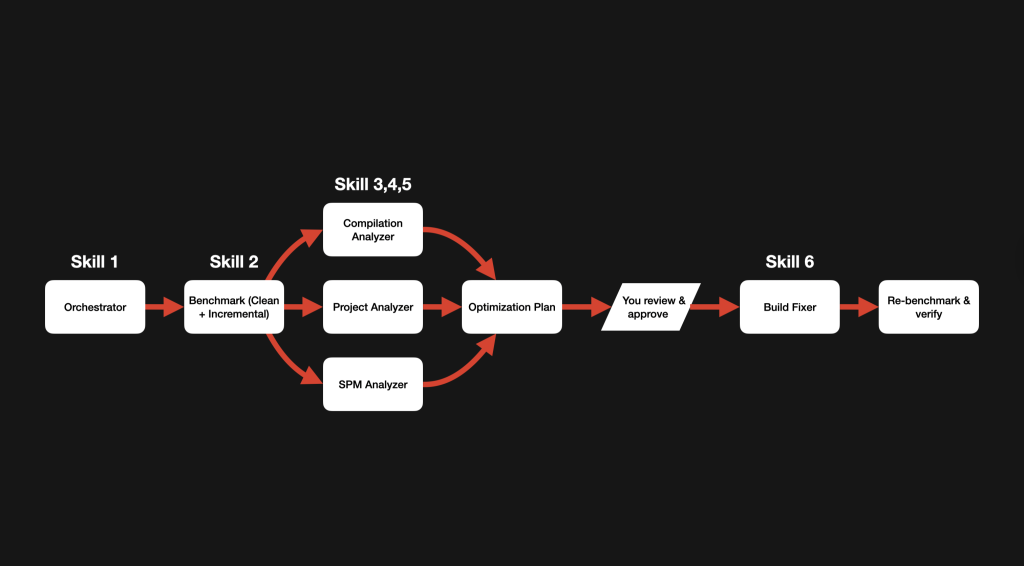
While there are six skills available, I highly encourage you to interact only with the orchestrator skill. This is the parent of all skills, and it can guide you through them one by one. Here are the steps taken:
- The orchestrator kicks off the optimization pipeline. It will analyze your project’s directory and prepares everything for benchmarking and optimizations.
- The Xcode Build Benchmark skill will perform 3 clean and 3 incremental builds. It stores it locally in a JSON file to use for reference.
- Then there’s an analysis phase, for which 3 specialized skills are used. Additional builds might be done using special settings to surface additional insights. The agent runs over 40 individual checks across build settings, project configuration, source code, and package dependencies.
- A detailed optimization plan is being generated and presented to you. It will tell you what’s correct already and where your biggest opportunities are.
- This is where you come back into place. You should always be in control, and reviewing the plan helps you avoid making changes you won’t be happy with.
- The final agent skill will apply the plan accordingly using best practices. It knows how to instruct agents to optimize build phases, reduce code complexity, or enabling specific build settings.
- Final benchmark and presentation of the results.
There’s really no risk in using this Agent Skill, and you’re not changing anything until you decide to commit and open a pull request. You can see it as a risk-free way to identify potential building improvements.
The final report will share with you the results, what it changed, the highest impact, and what was left untouched. For example, this is the final report for Helm:
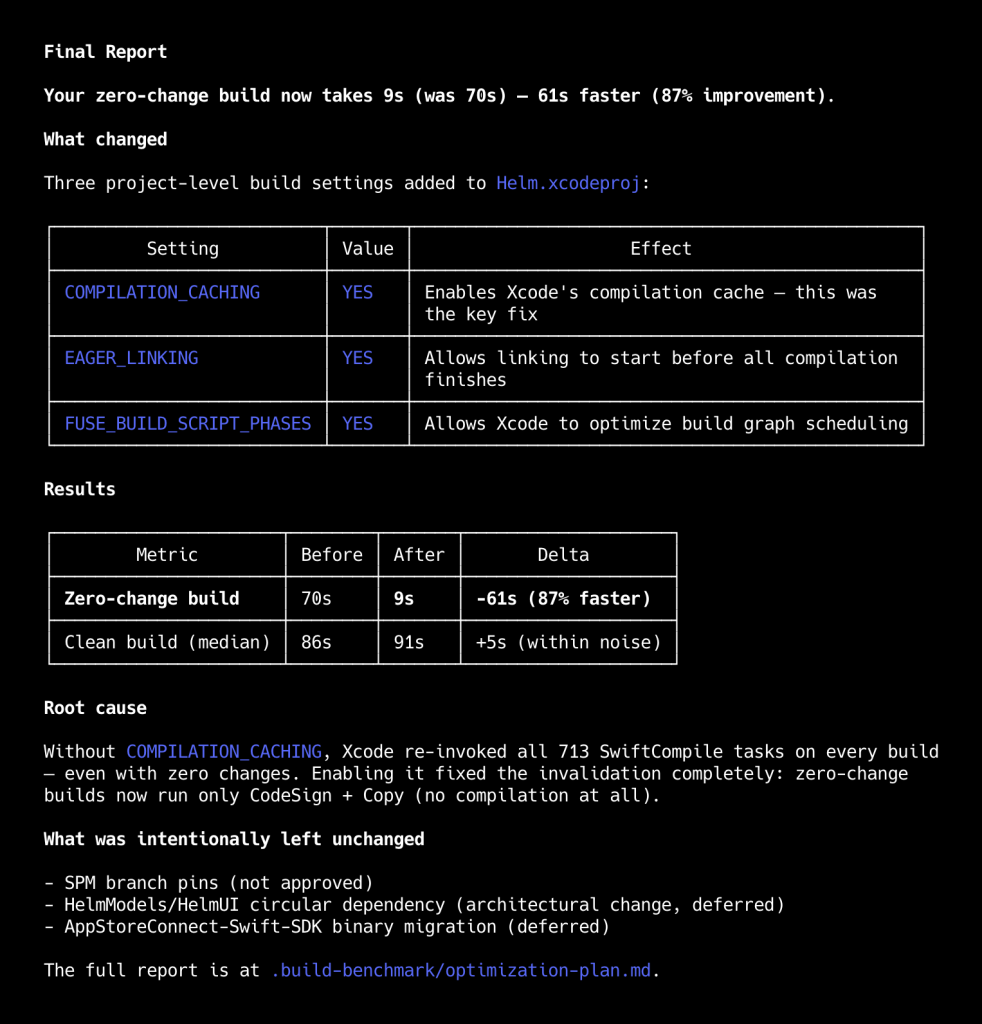
The skill aims to be transparent and will communicate the necessary details so you can do the things that matter most.
Quick Start: Analyzing your project
Here’s a quick start for you to try it out. Install the skill using the following command:
npx skills add https://github.com/avdlee/xcode-build-optimization-agent-skillThen open your preferred Agent inside your Xcode project’s folder, and prompt something like:
Use the /xcode-build-orchestrator skill to analyze build performance and come up with a plan for improvements.
The orchestrator skill will do its job, benchmark your project, and return a detailed plan for improvements. You decide what to apply, after which the orchestrator will continue and eventually return with your optimization results.
Keeping track of Xcode build durations
Of course, it’s important to keep an eye on future build durations. You might be optimizing today, but what if future changes influence your build durations badly?
I’ve written a dedicated article Xcode Build Insights: Keep track of project compilation times which will help you keep an eye sharp on any build impacting changes.
Agent Skills for Swift Concurrency, SwiftUI, and more
Here’s a quick link to install any of my Agent Skills: skills.sh/avdlee.
I’ve created dedicated skills for common domains:
- Swift Concurrency Expert Agent Skill
- SwiftUI Expert Agent Skill
- Core Data Expert Agent Skill
- Swift Testing Expert Agent Skill
Conclusion
The Xcode Build Optimization Agent Skill is a great way to analyze your Xcode projects for the latest best practices. It will tell you where to improve and whether you’re in a good state. An early adopter saved 20 seconds per build. At 10 builds a day, that adds up to ~5 hours saved every month. Imagine what you could do with that 😉
Enjoy!