

Apple released Swift 6.4 during WWDC 2026, introducing a range of convenience improvements for both the general Swift language and the Concurrency APIs. While Swift is open-source, many of the changes might still have surprised you. At the same time, WWDC sessions do not cover all the new changes (if you have even had a chance to watch many of them yet).
I follow the Swift Evolution proposals every week for my newsletter to inform 30K+ iOS developers about the latest Swift changes in progress, so I was keen to dive deeper into the concurrency changes. Here’s an overview for you!

Finding Swift version-related proposals
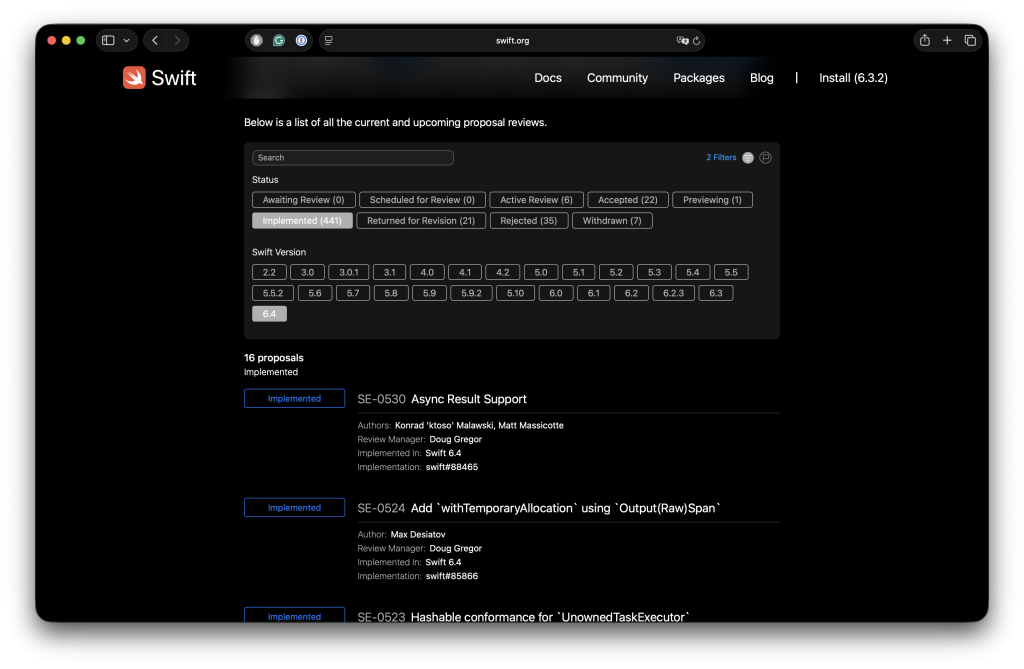
A brief introduction on how I keep track of all the changes: Swift Evolution: Reading and learning from proposals. I’m using this technique to save you from keeping track, by showing an overview in my free weekly newsletter (30K Subscribers). Join SwiftLee Weekly.
I keep track of Swift changes by reading Swift Evolution proposals every week. It’s the best way to understand not only what changed, but also why a feature was introduced and which trade-offs were discussed.
I explained my approach in Swift Evolution: Reading and learning from proposals. I use the same habit to summarize the most important Swift updates in SwiftLee Weekly, my free weekly newsletter read by 30K+ Swift developers.
Now that you know the story behind this overview, it’s time to dive into the first Swift 6.4 Concurrency change.
Async defer statements
Swift 6.4 implements SE-0493: Support async calls in defer bodies. This is one of those changes that feels obvious once you need it.
Before Swift 6.4, you could not call an asynchronous function inside a defer body, even if the surrounding function was already async. That was annoying for cleanup work, since defer is exactly the place where you want to guarantee cleanup on every exit path.
In Swift 6.4, the following code becomes valid:
func importArticles() async throws {
    let importer = ArticleImporter()
    await importer.open()

    defer {
        await importer.close() // We can now use await in here.
    }

    try await importer.importLatestArticles()
}
The defer body still runs when leaving scope, just like before. The difference is that Swift now implicitly awaits the asynchronous cleanup before the function returns.
I like this change because it removes the temptation to write manual cleanup on every possible exit path. If a function can throw after setup, defer keeps the setup and teardown close together.
One detail to keep in mind: asynchronous defer does not hide cancellation. If the current task is already cancelled, code inside the defer body can still observe cancellation. This brings us to the next Swift 6.4 change.
FREE 5-Day Email Course: The Swift Concurrency Playbook
A FREE 5-day email course revealing the 5 biggest mistakes iOS developers make with with async/await that lead to App Store rejections And migration projects taking months instead of days (even if you've been writing Swift for years)
Task cancellation shields
Swift 6.4 adds SE-0504: Task Cancellation Shields. A task cancellation shield temporarily prevents code from observing cancellation while a closure is running.
This sounds a bit abstract, so let’s look at the shape first:
func closeDatabaseConnection() async {
    await withTaskCancellationShield {
        print(Task.isCancelled) // Always false inside the shield, even if outer task is cancelled.
        await database.close()
    }
}
If the surrounding task was already cancelled before entering the shield, that cancellation still exists. The shield only makes code inside the closure observe Task.isCancelled == false, allowing cleanup work like database.close() to run. Once the closure returns, Task.isCancelled reports the original cancellation state again.
This is especially useful together with async defer:
func writeArticles(_ articles: [Article]) async throws {
    let transaction = await database.beginTransaction()

    defer {
        await withTaskCancellationShield {
            // We want this to always run, even if cancelled.
            await transaction.rollbackIfNeeded()
        }
    }

    try await transaction.insert(articles)
    try await transaction.commit()
}
I would not use cancellation shields everywhere. To be honest, I have not missed this feature in my own projects so far (although that could be a chicken-egg story). However, it is valuable for short cleanup or rollback work that must finish even if the task was canceled.
In other words: use cancellation shields to finish work you already started, not to hide cancellation from long-running operations.
Warnings for ignored throwing tasks
Swift 6.4 improves error handling for unstructured tasks through SE-0520: Discardable result use in Task initializers. The change helps you catch a subtle bug: creating a throwing task and then ignoring its returned task handle.
Before this change, the following code could silently ignore errors:
Task {
    try await importArticles()
}
That’s troublesome, since you might unexpectedly hide errors in your code. So, the task can throw, but nobody awaits task.value, and the task body does not handle the error. In Swift 6.4, Xcode warns you:
// warning: Unstructured throwing task was not used,
// which may accidentally ignore errors thrown inside the task
Task {
    try await importArticles()
}
You can fix the warning by handling errors inside the task:
Task {
    do {
        try await importArticles()
    } catch {
        print("Importing articles failed with error: \(error)")
    }
}
Or you can store the task handle and await the value later:
let importTask = Task {
    try await importArticles()
}

do {
    try await importTask.value
} catch {
    print("Importing articles failed with error: \(error)")
}
This is a small diagnostic improvement, but it can prevent real bugs. I have seen many codebases use Task { ... } as a quick escape hatch from synchronous code. The new warning nudges you to decide what should happen when that task fails.
If you really want to ignore the task handle, you can still write:
_ = Task {
    try await importArticles()
}
I would only do this when ignoring the failure is truly intentional. In most cases, handling the error inside the task is clearer.
Typed throwing task initializers
The same proposal builds on typed throws support in task initializers. This allows a Task to carry a more specific failure type:
let task: Task<String, URLError> = Task {
    throw URLError(.badURL)
}
You can see the difference in the updated initializer shape:
public init(
    priority: TaskPriority? = nil,
    operation: sending @escaping @isolated(any) () async throws(Failure) -> Success
)
The important part is throws(Failure). It matches the same typed throws model you can use in regular asynchronous functions.
In practice, this can make error handling clearer when you already know the failure type. I would not rewrite every task just to specify a typed failure, but it is nice to have the option when you’re building APIs that expose task handles.
Async Result support
Swift 6.4 also implements SE-0530: Async Result Support. The Result type already had a catching initializer for synchronous throwing work, but there was no built-in equivalent for async throwing work.
You can now write:
let result = await Result {
    try await importArticles()
}
Without this initializer, you would typically write the conversion yourself:
let result: Result<[Article], Error>

do {
    result = .success(try await importArticles())
} catch {
    result = .failure(error)
}
The new initializer is not a major language change, but it removes boilerplate in places where you intentionally want to store the outcome instead of throwing immediately.
I reach for Result less often now that async/await exists, but it is still useful when you need to pass success or failure around as a value. For example, when storing outcomes in a view model, logging failures, or collecting multiple results.
Weak let references
While we’re focused on Swift 6.4 in this article, I do also want to shine a light on Swift 6.3, which introduced SE-0481: weak let. This change is not limited to concurrency, but it helps with Sendable checking.
Before Swift 6.3, weak references had to be declared using var, even if you never assigned a new value yourself:
protocol ArticlePreviewDelegate: AnyObject, Sendable {
    func didSelectArticle()
}

final class ArticlePreviewController: Sendable {
    weak var delegate: ArticlePreviewDelegate?

    init(delegate: ArticlePreviewDelegate?) {
        self.delegate = delegate
    }
}
This causes a problem for Sendable classes, since a mutable stored property is not allowed:
// Stored property 'delegate' of 'Sendable'-conforming class
// 'ArticlePreviewController' is mutable
With Swift 6.3, you can write:
final class ArticlePreviewController: Sendable {
    weak let delegate: ArticlePreviewDelegate?

    init(delegate: ArticlePreviewDelegate?) {
        self.delegate = delegate
    }
}
The weak reference can still become nil when the delegate disappears. That does not mean you are assigning a different delegate yourself. It only means the weak reference stops being able to observe the object once it has been deallocated.
This distinction matters for Sendable checking. You can no longer replace the delegate after initialization, so the stored property behaves like an immutable reference from your code’s point of view.
Explicitly non-Sendable types
Swift 6.4 implements SE-0518: ~Sendable for explicitly marking non-Sendable types. It allows you to communicate that a type has been audited and should not conform to Sendable.
For example:
enum ExecutionResult: ~Sendable {
    case success
    case failure(NonSendable)
}
The tilde tells Swift to suppress automatic Sendable inference for this type. It also communicates intent to other developers: this enum has been audited and is intentionally non-sendable because one of its cases contains a non-sendable associated value.
This is especially useful for public APIs. If a public type does not conform to Sendable, users might wonder whether you forgot to add the conformance. With ~Sendable, you can make it explicit that the type is intentionally non-sendable.
There are a few rules to remember:
- You write
~Sendableon the type declaration itself, not in an extension. - You cannot combine
Sendableand~Sendableon the same type. - A subclass can still conform to
Sendableif it makes itself thread-safe.
That last point is important. Before this proposal, some libraries used an unavailable Sendable conformance to express “this type is not sendable.” The downside is that subclasses inherited that unavailable conformance too. ~Sendable gives library authors a cleaner way to document intent without blocking safe subclasses.
Get weekly Swift Evolution updates
Swift Concurrency keeps evolving, and it can be hard to keep up with every accepted proposal, Xcode change, and WWDC detail. I cover these updates every Tuesday in SwiftLee Weekly, read by 30K+ Swift and iOS developers.
You’ll receive a 5-minute email with the most important Swift changes, practical code snippets, and articles worth reading. If you want to stay ahead without checking Swift Evolution yourself every week, join SwiftLee Weekly.
Conclusion
Swift 6.4 brings several practical improvements to Swift Concurrency. Async defer makes cleanup easier, cancellation shields help with rare but important rollback scenarios, and the new task warning prevents errors from being silently ignored. On top of that, weak let and ~Sendable make Sendable adoption more expressive.
If you are migrating a codebase to Swift 6, these updates are worth knowing. Not every feature will change how you write code every day, but together they remove friction from strict concurrency adoption.
If you want to improve your Swift Concurrency knowledge even more, check out the Swift Concurrency Course. Feel free to contact me or tweet me on Twitter if you have any additional tips or feedback.
Thanks!