

Tasks in Swift Concurrency work with so-called suspension points. At that point, the executor can decide to start executing the task immediately or schedule it instead. It’s not necessarily visible when a task suspends, but we generally say they occur at a point where you write the await keyword.
If you want to learn the details around suspension points, I highly recommend taking my course at swiftconcurrencycourse.com. For this article, I want to highlight an unexpected and unneeded suspension point that can easily impact the performance of your app’s operations.

A busy Main-Thread
As we all know (hopefully), UI needs to be updated on the main thread. In Swift Concurrency, you can use the Main Actor to enforce that in code. You could, for example, have a view model that’s annotated as follows:
@MainActor
@Observable
final class ArticleViewModel {
    /// ...
}
Since there’s only one main thread, you need to be conscious about what you’re executing on it. If you perform a heavy blocking operation, you may be keeping the main thread busy. This could result in slower UI updates or UI hiccups.
In other words, as developers, it’s our task to ensure we only start running a task on the main actor if it’s truly needed. It’s important to understand how Swift Concurrency works and how it inherits an actor’s context. It could also be that your project settings are set to use the Default Actor Isolation for the Main Actor.
Inheriting Main-Actor isolation
Imagine adding a method to our view model that schedules a new task:
@MainActor
@Observable
final class ArticleViewModel {

    var isPublishingArticle = false
    /// ...

    func publish(_ article: Article) {
        isPublishingArticle = true

        Task {
            // Inherits the @MainActor isolation from the view model.
            // Starts executing on the Main Thread.
            await ArticlePublisher.publish(article: article)

            isPublishingArticle = false
        }
    }
}
The publish(_ article: Article) method is synchronous and starts a new Task to call the ArticlePublisher async method. We set isPublishingArticle to true on the Main Actor because it involves UI updates. Since our Task inherits the Main Actor isolation from the view model, we can directly assign false after publishing the article.
Now, let me be clear: there are better ways to write this method, such as assigning
trueinside an Immediate Task, but I’ve seen many developers use a similar method structure to the one above. That’s why I’d like to continue with this one.
FREE 5-Day Email Course: The Swift Concurrency Playbook
A FREE 5-day email course revealing the 5 biggest mistakes iOS developers make with with async/await that lead to App Store rejections And migration projects taking months instead of days (even if you've been writing Swift for years)
An unexpected suspension point
Let’s zoom in on the above created task:
Task {
    // Inherits the @MainActor isolation from the view model.
    // Starts executing on the Main Thread.
    await ArticlePublisher.publish(article: article)

    isPublishingArticle = false
}
It might not be immediately obvious, but the task is scheduled on the Main Actor. We have to wait for the main thread to become available before our task can even get started.
When the main thread is busy, it may take a little while for our task to start. However, what’s interesting: we don’t even do any work directly that requires the main thread!
The first real thing we do is call into ArticlePublisher using await. In other words, we suspend to switch isolation domains right after our task starts executing. This might be fine for this simple example, but I’ve seen code that performed many operations like this in a short time. We’re not only waiting unnecessarily, we’re also blocking the main thread for short moments of time, making the problem even bigger.
Visualizing the problem using Xcode Instruments
Using Xcode Instruments, we can visualize suspension points using the Swift Concurrency template. The following image shows how we’re rapidly jumping on the Main Thread and directly jump off from it again:
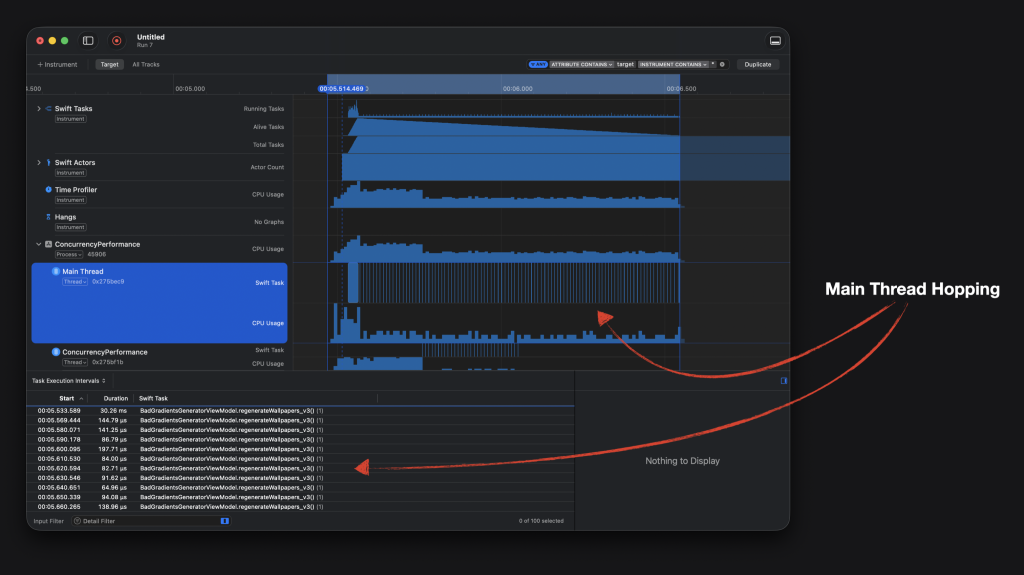
The performance decrease in your app depends entirely on what it is doing at the time of the operation. In my case, I was injecting new results into the UI live, which made it terribly slow.
There’s even a bigger problem in the code example above: we’re also requesting to return to the main thread:
Task {
    /// Inherits the @MainActor isolation from the view model.
    /// Starts executing on the Main Thread.
    await ArticlePublisher.publish(article: article)

    /// We now need to get back on the Main Thread
    /// so we can update `isPublishingArticle`.

    isPublishingArticle = false
}
However, if you’ve scheduled the above type of task a hundred times, other tasks might still be enqueued to run on the Main Thread. They’re basically scheduled, blocking your first task from returning and completing. A double performance hit and a slower time-to-first UI update.
Solving the unexpected suspension point
To me, the suspension point was quite unexpected. It was not immediately visible, but now that I know, it’s easy to detect it anywhere in my codebase. I directly updated my Swift Concurrency Agent Skill to prevent this from happening again.
The fix is quite simple: ensure the task starts executing on a different isolation domain immediately:
Task { @concurrent in
    await ArticlePublisher.publish(article: article)

    /// We now need to get back on the Main Thread
    /// so we can update `isPublishingArticle`.
    await MainActor.run {
        isPublishingArticle = false
    }
}
Note that we need to jump back to the main thread using MainActor.run.
The time to first result improved impressively for my personal code:
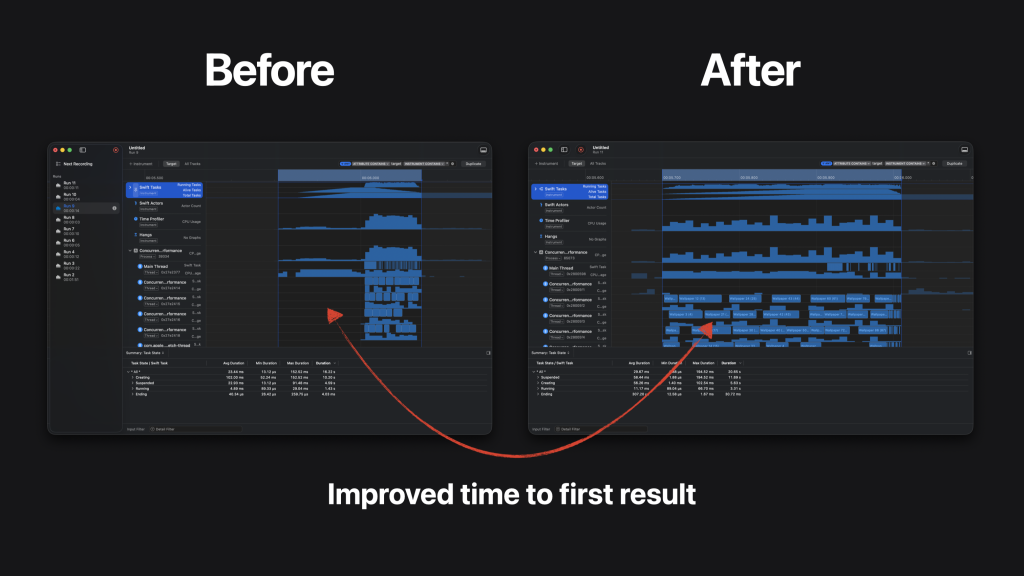
Once again, I executed the task many times in a short period. This exposed the problem more, but it’s a great example of how an innocent suspension point can result in bigger problems.
Conclusion
Swift Concurrency is optimized to help us write thread-safe code, but we still need to manage much of it ourselves. Using Xcode Instruments, we can visualize and identify unexpected suspension points that could have a big impact on your app’s performance.
Swift Concurrency is much more than just suspension points, so I’d love to invite you to check out www.swiftconcurrencycourse.com for an in-depth course on Swift 6.2 & Swift Concurrency.
Thanks!